
For creator agencies
A lightweight CRM alternative for creator agencies.
KitVerify organizes the creator side of your agency — roster, media kits, rates, campaign rosters, and inbound collaboration requests — from one workspace. It's not a full sales CRM, and this page is clear about where the line is.
Creator US$8.99/month, Solo US$29/month, Studio US$79/month. Cancel anytime.
The problem
Most agency work isn't a sales pipeline — it's roster ops
A traditional CRM is built to chase outbound deals. A creator agency's day-to-day is different: keeping every creator's kit and rates current, packaging the right creators for a brief, and responding to brands who reach out. That's the part KitVerify is built to organize.
- A generic CRM full of empty fields that don't match creator work
- Media kits and rates managed entirely outside the "CRM"
- Inbound brand interest with nowhere structured to land
- Rebuilding brand-facing shortlists by hand for each campaign
Inside the workspace
What the CRM-shaped work actually looks like here
Three screens from a real agency workspace. Read them as the answer to "what would we even put in a CRM": the queue, the account record, and what the account work produces.
01
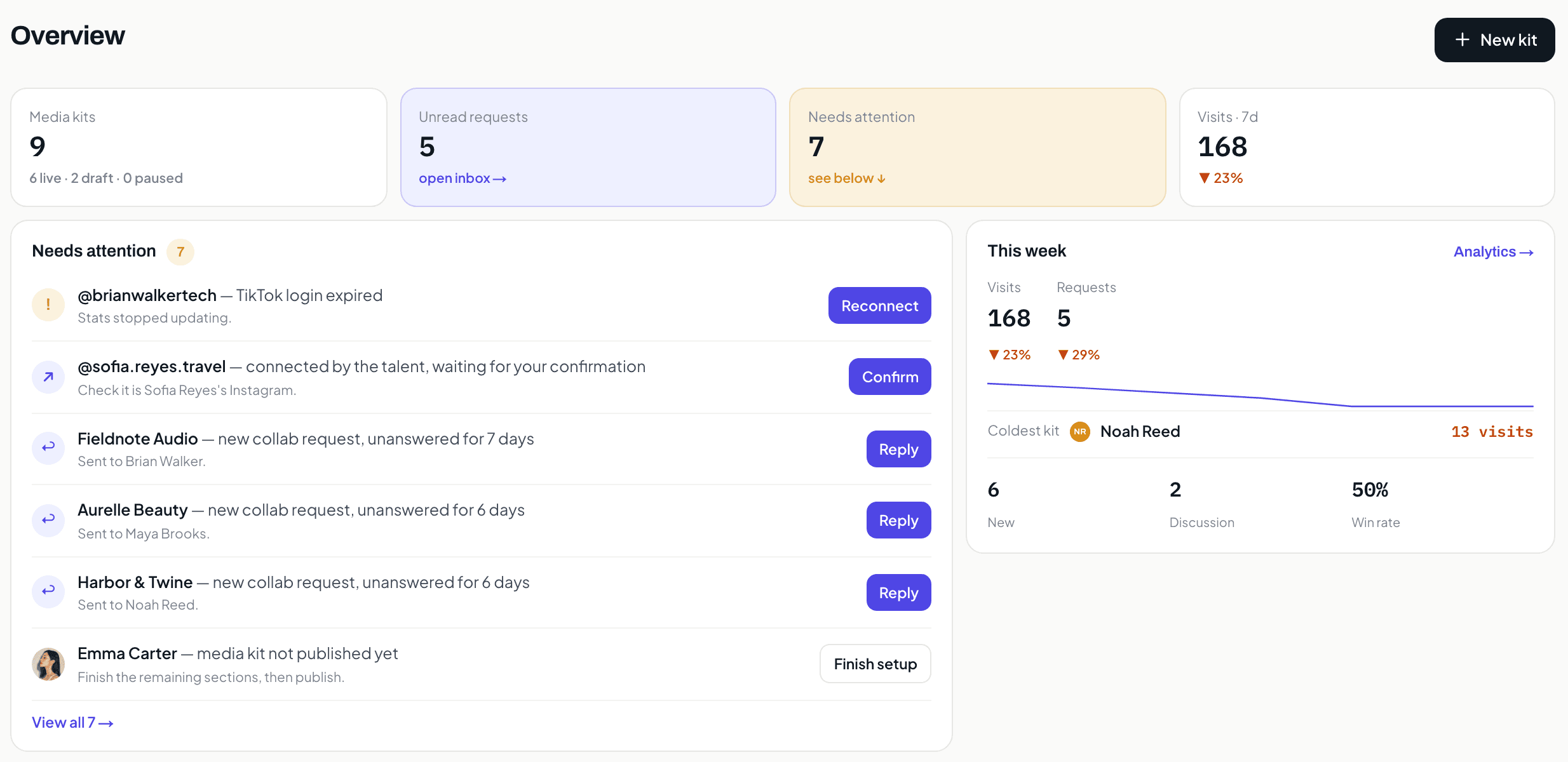
The pipeline is inbound, and it fits on one screen.
Unread requests, the brands waiting since a date, and the creators whose setup is unfinished. It is a queue you work down, not a funnel with stages you have to invent and then maintain.
02
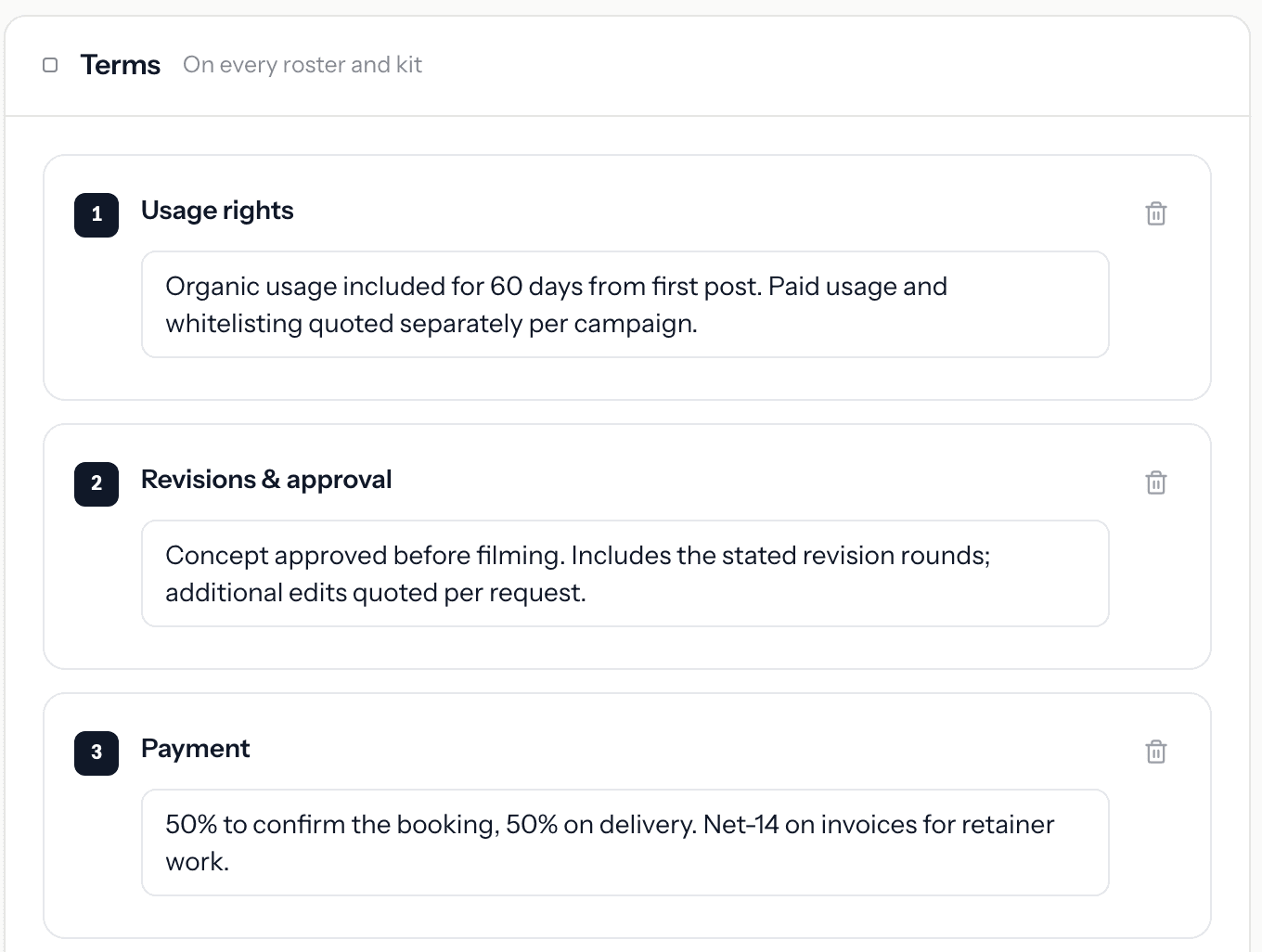
The record a sales CRM has no field for.
Usage rights, revision rounds, payment split. These are the terms every brand conversation turns on, they belong to the creator rather than to a deal, and they follow the creator onto every roster and kit automatically.
03
Your accounts are creators, so the fields are creator fields.
Followers, engagement, open requests, kit status. Compare that to a generic CRM contact record, where most of what you see does not apply and the parts you need are in a custom field somebody added.
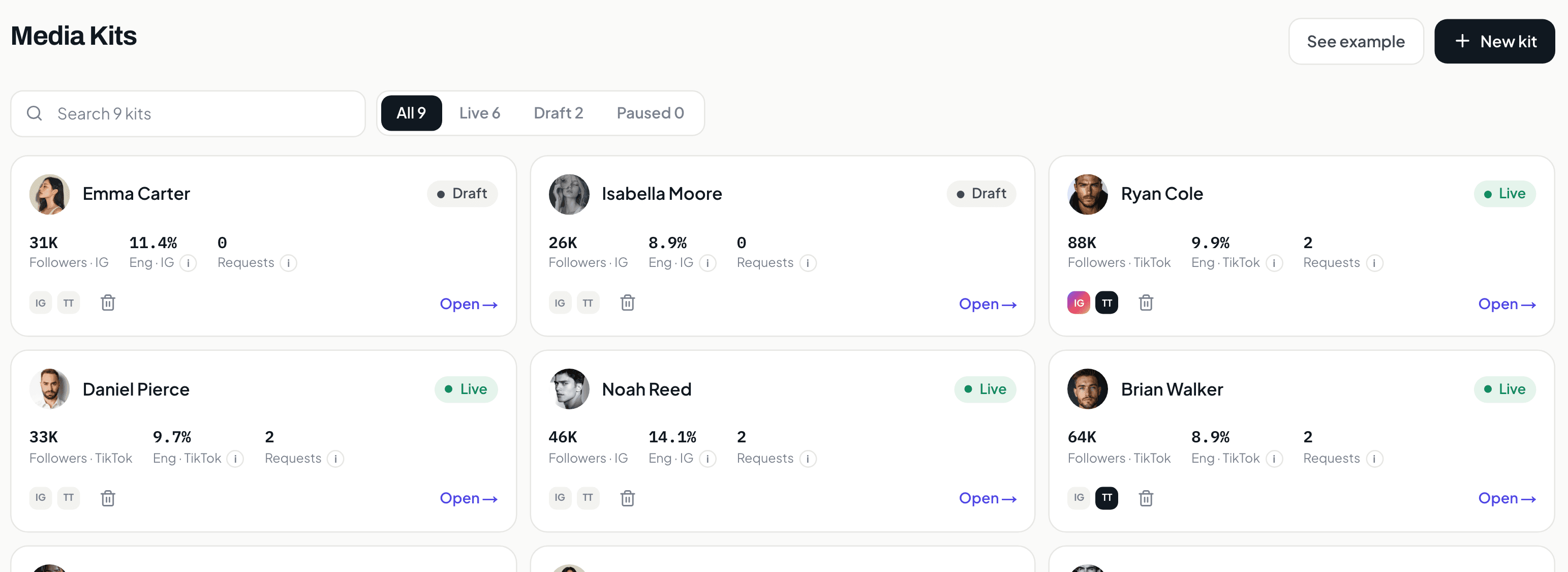
Screens from a KitVerify workspace seeded with sample creators. Numbers shown belong to that sample, not to a real roster.
What it does
What KitVerify organizes for you
The roster-operations side of a creator agency, in one place:
One workspace for every creator you represent
Keep each creator's media kit, rates, and audience in one place instead of a folder of PDFs. Build as many as you like — drafts are never capped on Solo and up — and the plan meters only how many stay published at once: 10 on Solo, 30 on Studio. (Creator is a single media kit.)
Live media kits you update once
Every creator gets a public media kit at a shareable link — audience, performance, past work, and packages. Edit it once and the link is current; no re-exporting a deck for every brand request.
Rates, packages, and terms in one view
Set each creator's packages and rates, keep a rates overview across the roster, and show your standard terms alongside them — so a brand sees the offer and the ground rules together.
Brand-facing rosters and shortlists
Build a campaign roster — a shortlist of the right creators for a specific brief — and share it as a clean public link or a PDF. Pick who is on it, what each one costs, and what the brand sees.
Inbound collaboration requests in one place
Brands reach out through a structured request on each kit — company, campaign, budget, timeline — and requests land in one inbox with a simple status you move as the conversation progresses.
Per-kit analytics
See how each media kit is doing — visits, engagement, and which packages and sections draw interest — so you know which creator to put in front of which brand.
How it works
How KitVerify works
Step 1
Create your manager workspace
Sign in with Google and you get a talent-manager workspace. Start adding the creators you represent — you can build a media kit before a creator has even signed up.
Step 2
Build each creator's kit, rates, and terms
Fill in audience, past work, packages, and rates for each creator. Send a delegated connect link so they attach their own Instagram or TikTok read-only, and supported metrics sync with a source label.
Step 3
Pitch with rosters and collect requests
Assemble a campaign roster for a brief, share it as a link or PDF, and let brands send structured collaboration requests that land in one inbox with a simple status.
Honest scope
What KitVerify does not replace
This is intentional. KitVerify is a creator-management workspace, not a full sales CRM. It does not do:
- Outbound brand discovery or lead generation — you bring your brand relationships; KitVerify organizes the creator side.
- A persistent brand/contact CRM with pipelines and reminders — the inbound request list is a simple status view, not a full sales pipeline.
- Automated email outreach, sequences, or inbox/Gmail sync.
- Contracts, e-signatures, invoicing, payment tracking, or revenue accounting.
- Campaign delivery management or full post-campaign reporting.
FAQ
Common questions
Is KitVerify a CRM?
Not a traditional sales CRM. It's a creator-management workspace that covers the CRM-adjacent work a creator agency actually does: organizing the roster, media kits, rates, brand-facing rosters, and inbound collaboration requests. It has no outbound pipeline, email sequences, contracts, or invoicing.
Does it store brand contacts and deal pipelines?
No persistent brand-contact CRM or multi-stage deal pipeline. Inbound collaboration requests land in one inbox with a simple status you move as a conversation progresses — enough to stay organized, not a full pipeline tool.
Can it handle contracts, invoicing, or payments?
No. Contracts, e-signatures, invoicing, payment tracking, and revenue accounting are outside KitVerify. It organizes how you present creators and field inbound interest — pair it with your existing tools for the money and paperwork.
How is this different from the talent manager CRM page?
Same product, different framing. This page is for an agency organizing its roster; the talent manager CRM page is for a solo manager running multiple creator relationships.
Related
Keep exploring
Talent manager CRM
For the solo manager running multiple creator relationships.
Creator management software
For boutique agencies running a roster of creators.
Creator roster management
Move your roster off spreadsheets into one workspace.
Influencer agency software
Run a small influencer agency's creator side from one place.
Organize the creator side. Keep your own back office.
A lightweight, honest alternative for the roster operations a sales CRM was never built for.