
For talent managers
Media kit automation for a whole roster.
One media kit is a design job. Ten is a maintenance job. KitVerify takes the maintenance: supported Instagram and TikTok metrics sync read-only from the official APIs, and a single edit reaches the public link, the PDF, and every campaign roster that creator appears on.
Creator US$8.99/month, Solo US$29/month, Studio US$79/month. Cancel anytime.
The problem
The manual work isn't building the kit — it's keeping ten of them current
Building one creator's deck is an afternoon. The cost shows up later: every brand conversation starts with chasing that creator for fresh screenshots, re-exporting the file, and hoping the rate in the PDF matches the rate in the roster you sent last week. That work grows with every creator you sign, and none of it is the job you were hired for.
- Asking each creator for a screenshot of their analytics before every pitch
- Re-exporting a deck the moment a follower count or a rate moves
- The same package priced in a kit, a roster, and a PDF — and only two of them updated
- No way to tell whether the roster you sent a brand was ever opened
Inside the workspace
What "updates itself" actually looks like
Three screens from a real manager workspace. This is the whole mechanism: the creator connects once, you keep one record, and every brand-facing surface reads from it.
01
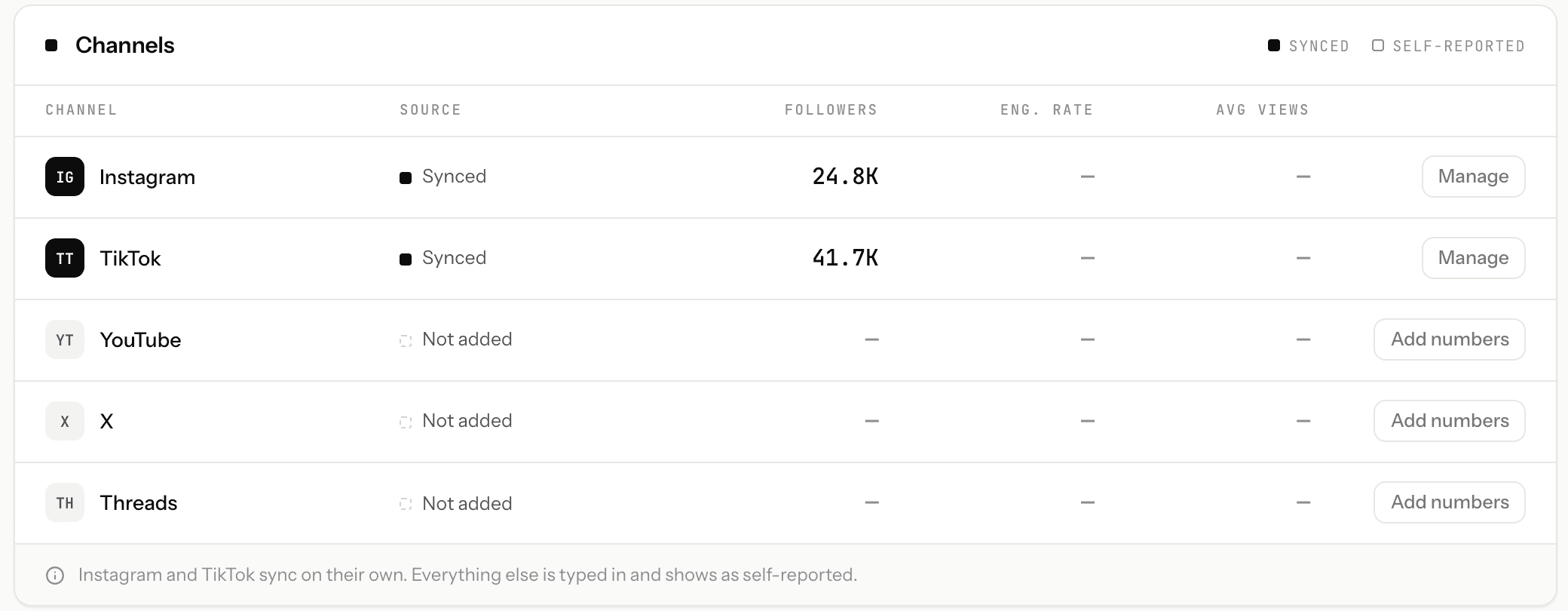
The creator connects once. The platform reports after that.
Instagram and TikTok carry a Synced label and refresh without anyone re-typing them. A platform nobody has connected reads Not added rather than guessing, and any number you enter by hand stays labelled self-reported — so a brand can always tell which is which.
02
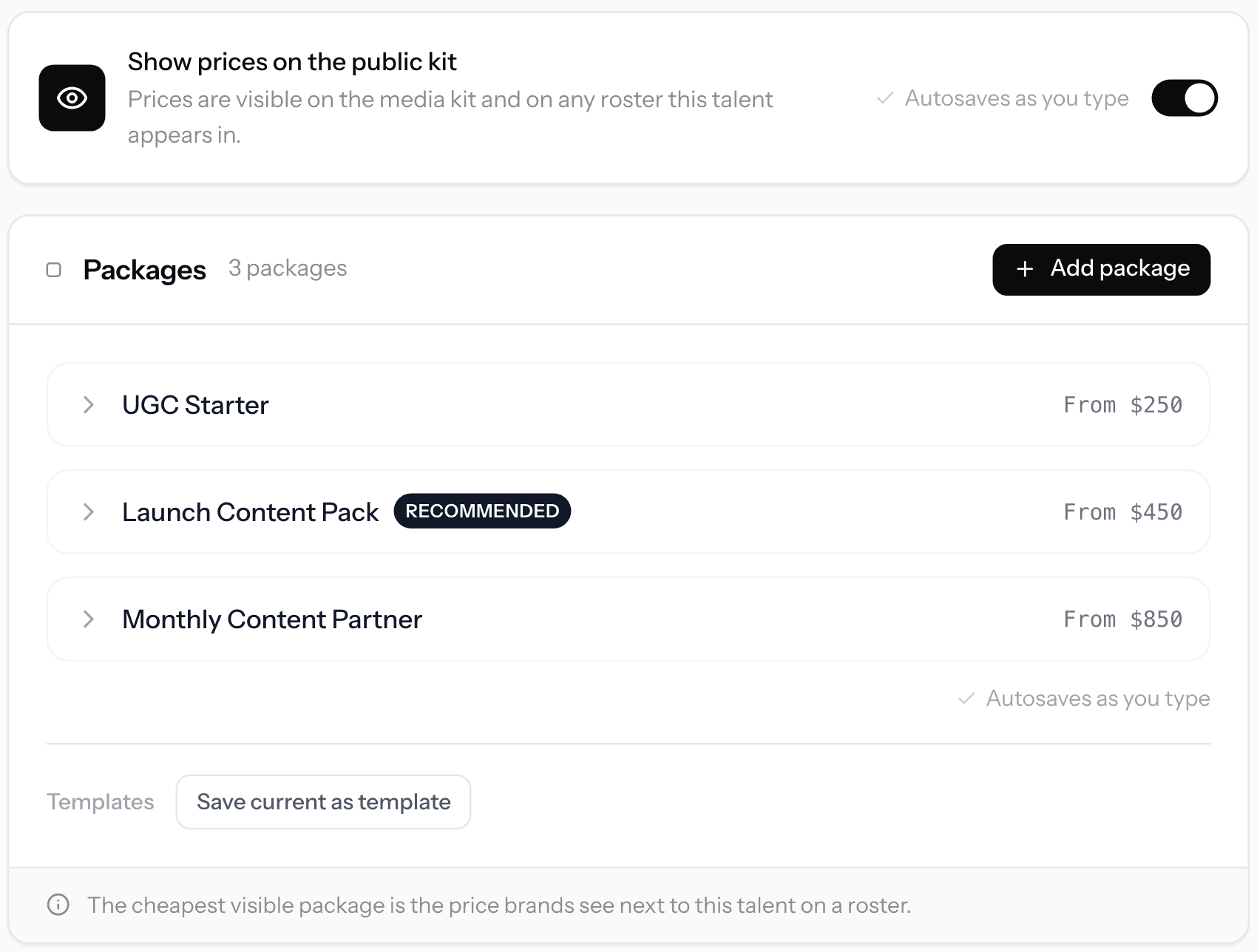
Change a rate once. It is already on the kit and every roster.
Packages live on the creator and autosave as you type. One switch decides whether prices are public, and it applies to the media kit and to every roster that creator appears on. There is no second copy to remember.
03
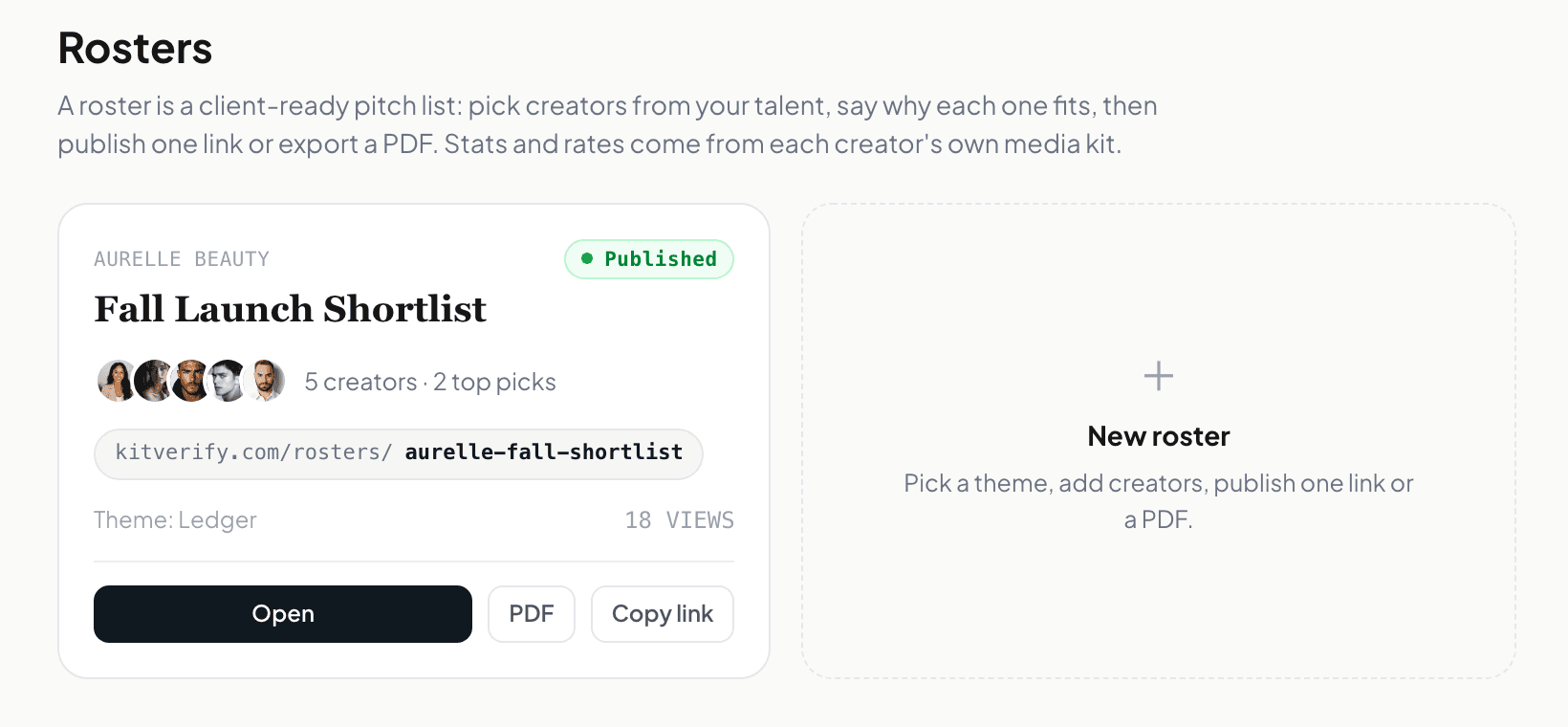
Publish once, share the link, watch the count.
The roster gets a public link and its own visit count, and the PDF stays an export you take when a brand asks for a file. On a paid plan you can also give each brand its own named link to the same roster, so the counts stay separate per pitch.
Screens from a KitVerify workspace seeded with sample creators. Numbers shown belong to that sample, not to a real roster.
What it does
What actually runs on its own
These are the parts KitVerify keeps current for you. The section after this one names the parts it deliberately does not.
Optional read-only social connection
Creators can connect Instagram or TikTok read-only so supported metrics sync from the official APIs with a source label. Delegated connect links let each creator link their own account — no shared passwords, no logins to manage.
Delegated connect for your talent
Send a creator a connect link and they link their own Instagram or TikTok and confirm their details — you keep the workspace, they keep their credentials.
One edit reaches every place the creator appears
Change a rate, a package, or a top post once on the creator's kit and the public link, the PDF export, and every campaign roster that creator sits on all read the same record. There is no second copy to remember.
A named link per brand, with visits counted
Share one roster as a separate named link for each brand you pitch — the label stays private, the link is public — and each link keeps its own visit count. Collaboration requests that arrive through a link are attributed back to it.
Inbound collaboration requests in one place
Brands reach out through a structured request on each kit — company, campaign, budget, timeline — and requests land in one inbox with a simple status you move as the conversation progresses.
Per-kit analytics
See how each media kit is doing — visits, engagement, and which packages and sections draw interest — so you know which creator to put in front of which brand.
Share a link or export a PDF
Everything brand-facing — a creator's media kit or a campaign roster — can be shared as a live link or downloaded as a clean PDF when a brand wants a file.
How it works
How the automation is set up
Step 1
Add the creators you represent
Build a kit per creator from one manager workspace — audience, past work, packages, and rates. You can build a creator's kit before they have signed up, and drafts are not capped.
Step 2
Send each creator a connect link
They attach their own Instagram or TikTok through the official read-only login. Supported metrics then sync on their own, each carrying a source label and the time it was last refreshed. Nothing is scraped and no password is shared with you.
Step 3
Edit once, pitch all week
From then on you maintain one record per creator. Pull a few of them into a campaign roster, give each brand its own named link, and every view is counted against the link that produced it.
Honest scope
What KitVerify does not automate
"Automation" covers a lot of ground in this category, and most of it is outside KitVerify on purpose. To be specific, it does not do:
- Post-campaign reporting. KitVerify measures how a media kit or roster is performing — not how a delivered campaign performed. Nothing pulls in the results of a live brand deal.
- Outbound automation. No email sequences, no inbox or Gmail sync, no brand discovery, no auto-pitching. You decide who gets the link and you send it.
- Contracts, e-signatures, invoicing, payment tracking, or revenue accounting.
- Publishing. KitVerify never posts, schedules, or edits anything on a creator's account — the social connection is read-only.
- Every metric. Only what the official Instagram and TikTok APIs expose can sync. Everything else stays typed in and is labeled self-reported, with the date it was entered.
FAQ
Common questions
How does a media kit update automatically?
Through the official Instagram and TikTok APIs, with the creator's read-only consent. Once a creator connects their account, the metrics those APIs expose refresh on the kit without anyone re-typing them, and each one shows where it came from and when it was last synced. A kit with no connected account still works — its numbers are just labeled self-reported.
How often do the numbers update?
Automatically, once a day. Each night the sync worker re-pulls every connected Instagram or TikTok account whose numbers are more than 23 hours old from the official API, longest-unrefreshed first. Opening a media kit or roster link queues the same refresh for any account past 23 hours — the page shows the current snapshot straight away and the next visitor sees the new one. Every synced number carries its own last-synced time, so a brand can always see how fresh it is. Nothing is refreshed more often than that: the platforms rate-limit their APIs, and hour-to-hour changes are too small to matter in a pitch.
Do my creators have to hand me their passwords?
No, and there is no version of this where they do. You send a delegated connect link and the creator signs in to Instagram or TikTok themselves, granting read-only access. You keep the workspace, they keep their credentials, and they can disconnect at any time.
Which numbers sync and which ones don't?
Only what the official APIs return for a connected account can sync — that is the hard limit, and it differs between Instagram and TikTok. Anything outside it (older campaign results, off-platform audience data, rates, terms) is entered by you and stays clearly marked as self-reported. KitVerify never estimates a number to fill a gap.
Does it automate campaign reports or brand outreach?
No to both. KitVerify has analytics for how a kit or a roster link is performing, but it does not pull in results from a delivered campaign or generate a post-campaign report. And there is no outbound side at all — no email sequences, no inbox sync, no brand discovery. You send the link to the brands you already know.
How many creators does this hold?
Up to 10 published media kits on Solo (US$29/month) and 30 on Studio; Scale covers larger rosters. The limit is on what you publish — drafts are not capped, so you can build ahead.
How is this different from a media kit builder?
A builder makes one creator a good-looking kit. This is built for the manager holding many of them at once: one workspace per roster, delegated connection so each creator maintains their own numbers, campaign rosters assembled from kits you already have, and a per-brand link on each pitch. The kit is the output, not the product.
Related
Keep exploring
Talent management software
The purpose-built workspace for managers of creators.
Creator roster management
Move your roster off spreadsheets into one workspace.
Talent manager tools
How managers actually run a roster — spreadsheets to purpose-built.
Creator management software
For boutique agencies running a roster of creators.
Update once. Pitch all week.
Connect your creators' accounts read-only and stop asking them for screenshots before every pitch.