
Creator roster management · for talent managers
Your creator roster, ready the moment a brand asks.
One workspace holds every creator you manage: media kit, rates and audience. When a brand asks who fits, you send one roster link that reads from those kits, instead of rebuilding a deck from a spreadsheet and a folder of PDFs.
No free plan — plans from US$8.99/month. Cancel anytime.
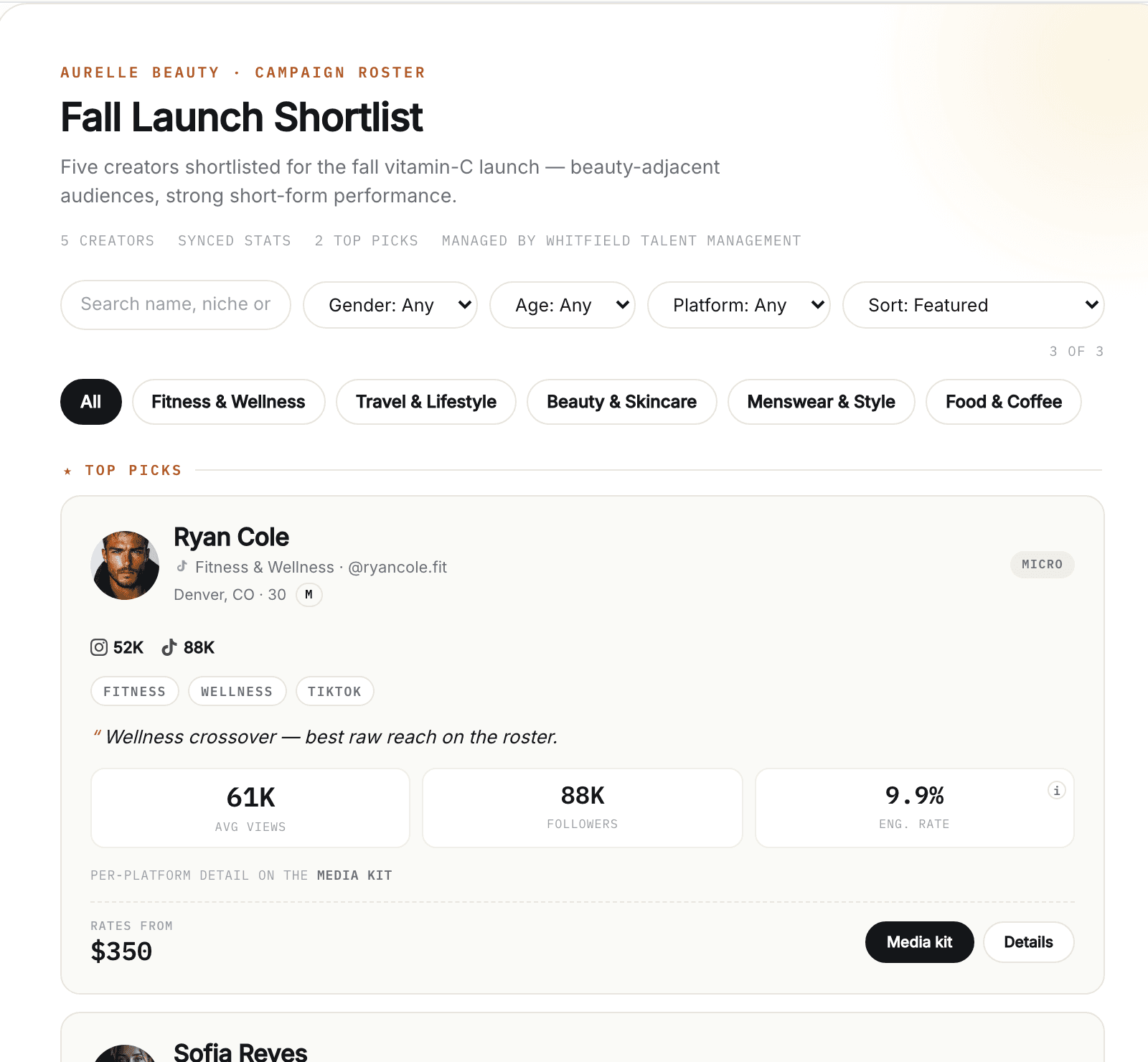
A real KitVerify workspace, seeded with sample creators. The numbers belong to that sample, not to a real roster.
Before and after
A roster spreadsheet is a map to files you still maintain by hand
The sheet is a fine index. It cannot show a brand a media kit, and it cannot package a shortlist for a brief, so every request sends you back to the drive, the rate sheet and last month's screenshots.
Before
- A row per creator that points to a PDF, a Canva link and a rate note
- Rates in a sheet, terms in a doc
- Stats in screenshots the creator sent last month
- A "who fits this brief" shortlist rebuilt from scratch every time
With KitVerify
- One record per creator: kit, rates, terms and audience
- A roster per brief, published as one link with filters and packages
- A PDF export when a brand wants an attachment
- Instagram and TikTok numbers that sync once a creator connects, labelled by source
What you get
What a roster in KitVerify does that the sheet cannot
Three things the spreadsheet was standing in for.
01
Every creator stays brand-ready
Each creator has a public media kit at one link. Edit it once and every link you have already shared shows the change.
02
Creator information stays together
Profile, channels, audience, top content, rates and terms live on the creator, not across a drive, a sheet and a chat thread.
03
Brands get one roster, not a folder
Pick the creators that fit a brief, publish a roster link with filters, numbers and packages, and see how often it was opened. Export a PDF when asked.
Inside the workspace
What the spreadsheet becomes
Three screens from a real manager workspace: the roster itself, the pitch you build from it, and what each creator costs. The brand's view is the page at the top.
01
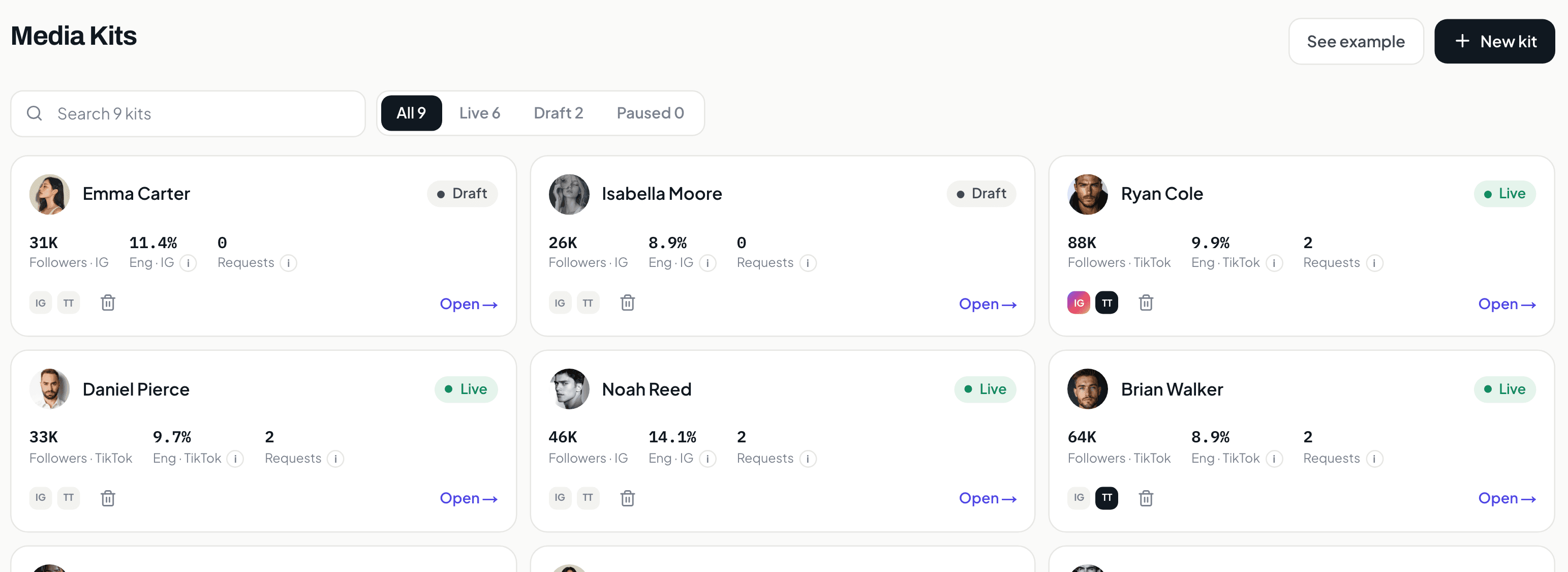
Every creator, holding the columns your sheet was holding.
Followers, engagement rate, and open requests per creator, plus whether their kit is live, still a draft, or paused. Filter by status instead of scrolling to the tab you named ROSTER_FINAL_v3.
02
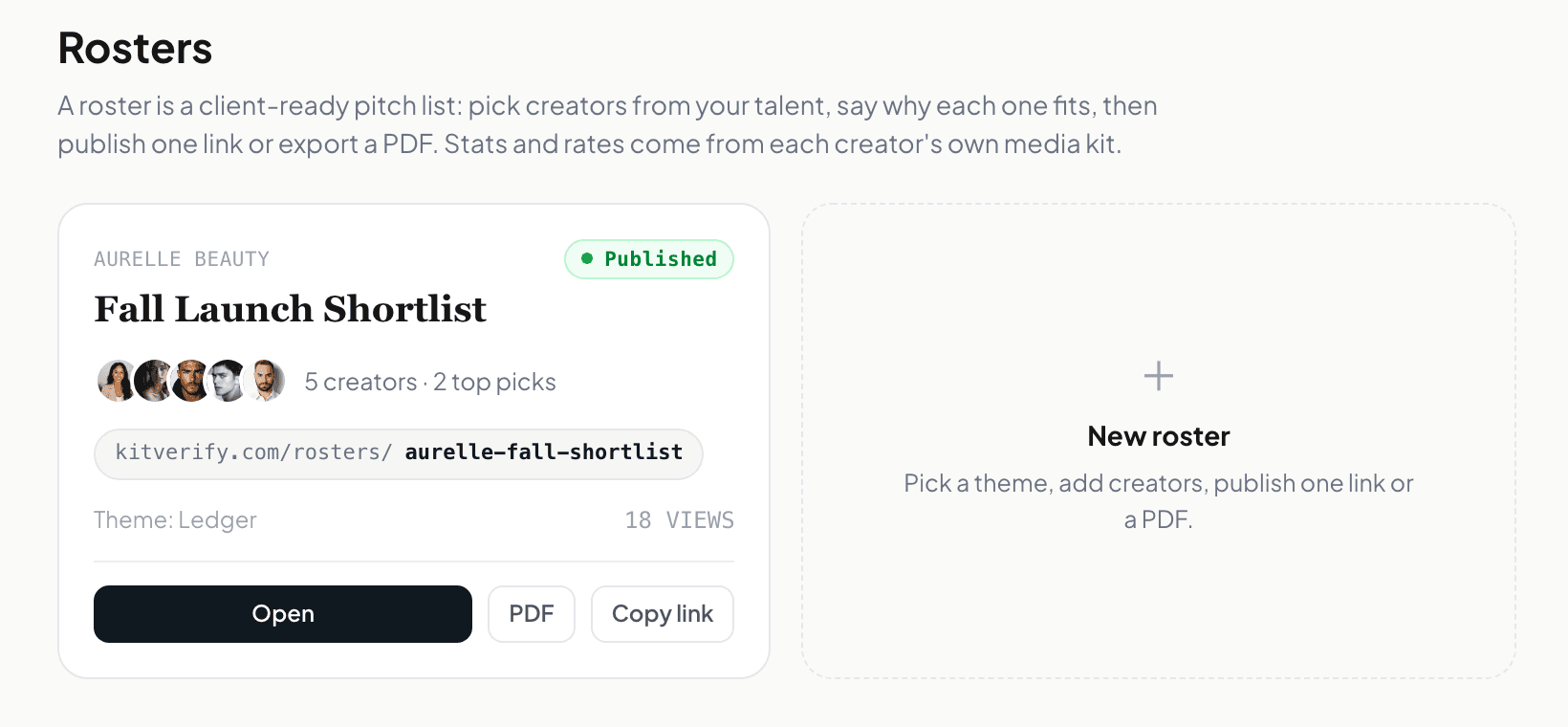
A shortlist for one brief, published as one link.
Pick the creators that fit, publish, and share the link. The PDF is an export you take when a brand wants an attachment, not the thing you maintain by hand for every conversation.
03
What each one costs, on the creator, shown per pitch.
Packages and prices sit on the creator record and autosave as you type. One switch decides whether a brand sees prices, on the kit and on every roster that creator is on.
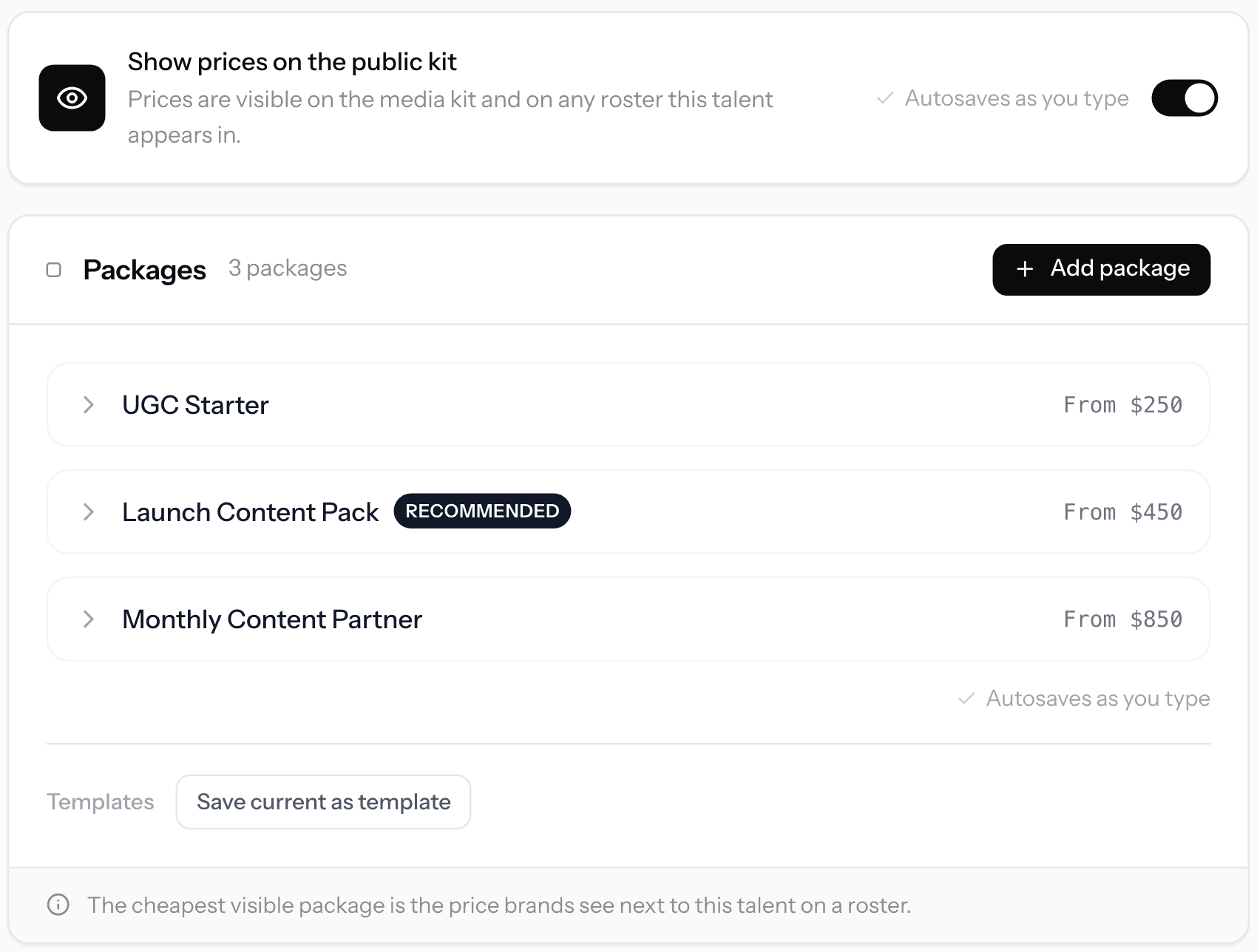
Screens from a KitVerify workspace seeded with sample creators. Numbers shown belong to that sample, not to a real roster.
How it works
How KitVerify works
Step 1
Create your manager workspace
Sign in with Google and you get a talent-manager workspace. Start adding the creators you represent — you can build a media kit before a creator has even signed up.
Step 2
Build each creator's kit, rates, and terms
Fill in audience, past work, packages, and rates for each creator. Send a delegated connect link so they attach their own Instagram or TikTok read-only, and supported metrics sync with a source label.
Step 3
Pitch with rosters and collect requests
Assemble a campaign roster for a brief, share it as a link or PDF, and let brands send structured collaboration requests that land in one inbox with a simple status.
What it does
What replaces the spreadsheet
Everything the sheet was standing in for, and the brand-facing output it never had.
One workspace for every creator you represent
Keep each creator's media kit, rates, and audience in one place instead of a folder of PDFs. Build as many as you like — drafts are never capped on Solo and up — and the plan meters only how many stay published at once: 10 on Solo, 30 on Studio. (Creator is a single media kit.)
Live media kits you update once
Every creator gets a public media kit at a shareable link — audience, performance, past work, and packages. Edit it once and the link is current; no re-exporting a deck for every brand request.
Brand-facing rosters and shortlists
Build a campaign roster — a shortlist of the right creators for a specific brief — and share it as a clean public link or a PDF. Pick who is on it, what each one costs, and what the brand sees.
Rates, packages, and terms in one view
Set each creator's packages and rates, keep a rates overview across the roster, and show your standard terms alongside them — so a brand sees the offer and the ground rules together.
Optional read-only social connection
Creators can connect Instagram or TikTok read-only so supported metrics sync from the official APIs with a source label. Delegated connect links let each creator link their own account — no shared passwords, no logins to manage.
Per-kit analytics
See how each media kit is doing — visits, engagement, and which packages and sections draw interest — so you know which creator to put in front of which brand.
Who it is for
Built for the people who actually run a roster
Independent talent managers
You represent a handful to a few dozen creators yourself, and every brand request currently starts with finding the right file.
Boutique creator agencies
A small roster that has to look as finished as a big agency's, without a design team or a heavy stack.
FAQ
Common questions
Can I move my roster spreadsheet in?
You rebuild each creator as a media kit in the workspace; there is no spreadsheet import today. The payoff is that each row becomes a live, brand-facing kit instead of a link to a file you maintain separately.
Can I make a shortlist for one brand or campaign?
Yes, that is a campaign roster. Pick the creators that fit the brief, choose what each one shows and costs, and share it as a public link or a PDF. It is the brand-facing output a spreadsheet cannot produce.
Is it built for managing multiple creators?
Yes. On Solo and up one workspace holds the whole roster, drafts are never capped, and you can build a creator's kit before they sign up. Publishing is the part the plan meters: 10 live kits on Solo, 30 on Studio.
How is this different from Airtable or Notion?
Airtable and Notion are flexible databases you have to design and maintain. KitVerify is purpose-built for a creator roster: media kits, rates, brand-facing rosters, and inbound requests come ready-made, so you present creators instead of building a system.
What does KitVerify cost?
There is no free plan. Creator is US$8.99/month for 1 media kit and 1 campaign roster, live. For a whole roster, Solo is US$29/month for 10 live talents with drafts never capped, Studio is US$79/month for 30, and Scale is custom. Cancel anytime.
Your roster, ready before the next brief lands.
Build every creator, keep up to 10 live on Solo, and send your first roster link today.
Creator US$8.99/month, Solo US$29/month, Studio US$79/month. Cancel anytime.
Related
Keep exploring
Talent manager tools
How managers actually run a roster — spreadsheets to purpose-built.
Talent management software
The purpose-built workspace for managers of creators.
Creator management software
For boutique agencies running a roster of creators.
Spreadsheets vs talent management software
When a spreadsheet is the right answer, and when the maintenance cost compounds.