Media Kits
Influencer Media Kit Examples: What Each Section Looks Like on a Real Kit
Not templates — examples. The sections of an influencer media kit as they render on a live kit, one openly labelled demo you can open, and the shape to copy at every follower size.
What an influencer media kit carries
One live kit
- Profile + niche
- Synced numbers
- Audience split
- Featured work
- Rate card
- Terms
- Contact
Most pages titled "influencer media kit examples" show a gallery of Canva templates with a stock photo and a made-up follower count. They answer "what could it look like" and leave the useful question alone: what does each section actually contain, and what does a brand do with it.
This is the other kind of examples page. It walks through an influencer media kit the way a brand opens one — section by section, in reading order — and shows what each part looks like on a kit that pulls its own numbers from Instagram. There is one real kit to open at the end (a demo, labelled as such), and a generator that builds yours from a username.
Example 1: the header — profile, niche, and the synced badge
The first screen of a kit answers two questions in under five seconds: who is this, and are these numbers real. On a KitVerify kit the header carries the name, the handle, a one-line positioning ("Home cooking for people who hate washing up" works; "Lifestyle creator" does not), a niche tag, and a location. Under it sits the stats band.
Header, as a brand reads it
The fields, not a person
- Name + handle
- The display name and the @handle the kit was built from
- Positioning
- One sentence: the subject and who shows up for it
- Niche
- One or two tags a brand filters on
- Stats band
- Followers, engagement rate, average likes and comments — each under a Synced · live via Instagram pill when it came from the platform
Example 2: the numbers — what is pulled, what is typed
An honest kit keeps two kinds of numbers apart. Platform numbers (followers, recent-post likes and comments, the engagement rate computed from them) come from the API and are labelled. Everything else — audience gender split, age brackets, top countries — is either synced from a connected account or typed by the creator, and the kit says which.
| Field | Source on the kit | How it is labelled |
|---|---|---|
| Followers | Instagram API | Synced |
| Engagement rate | Computed from the pulled posts, based on followers | "Based on followers" |
| Average likes / comments | Computed from the pulled posts | Synced |
| Audience gender / age / country | Connected account, or typed | Synced, or no label (self-reported) |
| Rates and terms | Typed | No label — these are decisions, not measurements |
Nothing on the kit is estimated. A field the platform did not return is left out rather than guessed, which is why an Instagram-only kit built from a username shows no "average views" tile: the public lookup does not return per-post views, so the kit does not pretend to know them.
Example 3: the audience block
This is the section brands ask for most and creators leave out most. On the example kit it is three small charts: a gender bar, an age-bracket bar, and a top-countries list. If the creator typed these in, the kit shows them without a Synced tag; if the account is connected, the demographics come from Instagram's own insights and carry the label.
- Gender — a single bar, with an "Undisclosed" remainder so it always adds to 100%.
- Age — the standard Instagram brackets (18–24, 25–34, 35–44 and up).
- Countries — the top three to five, by share of audience.
- Interests — a short tag list, typed, because no API returns it.
Example 4: featured work
Proof you can execute. On a kit built from a username this is the creator's recent top posts, pulled with their like and comment counts and shown as a small grid. Once the kit is claimed the creator can swap in campaign work — a branded post with its result, if they have one — but the organic grid is already a stronger signal than a mood board: it is the actual content, with the actual response.
Example 5: the rate card
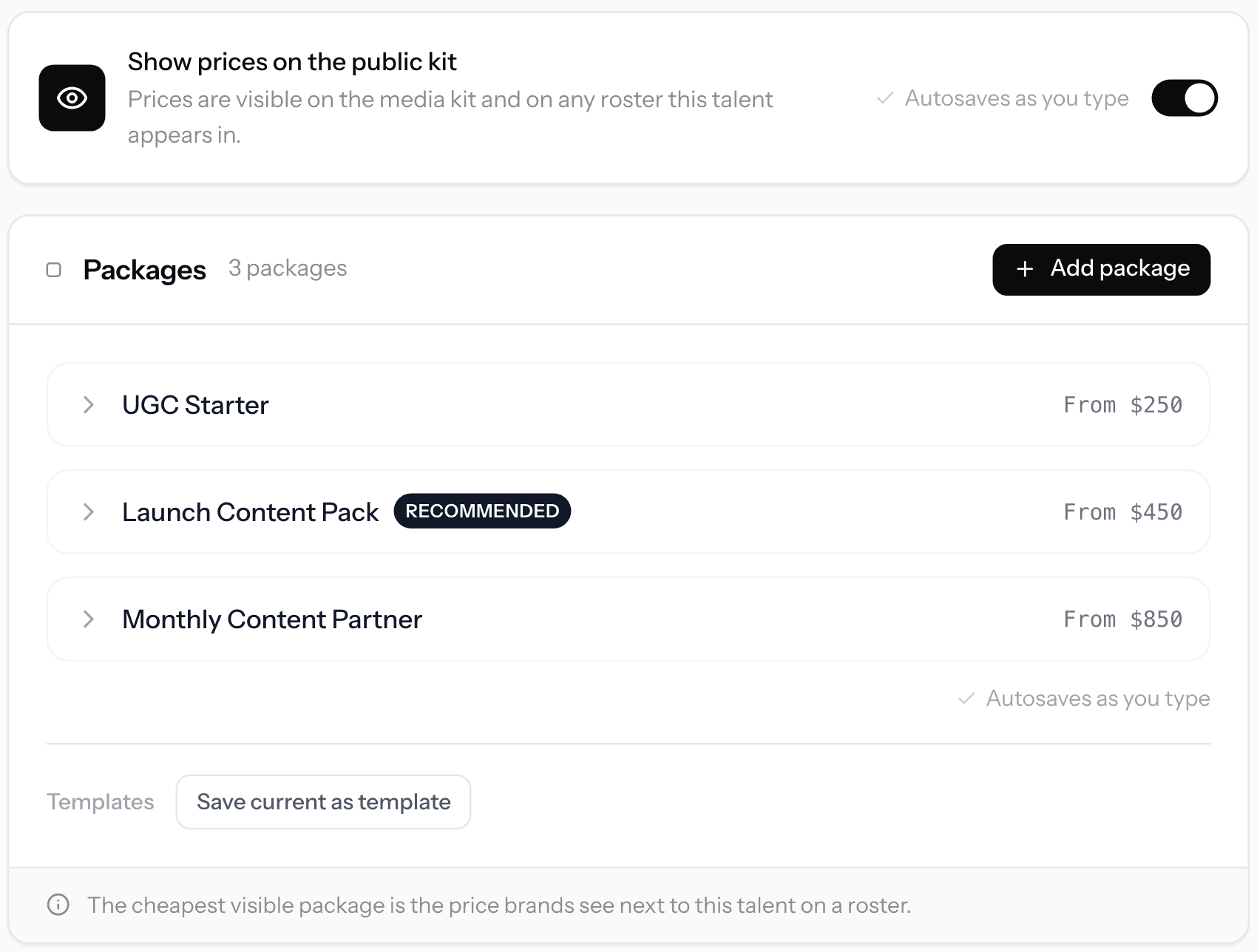
Three packages is the shape that works on most kits: a single deliverable (one Reel, one story set), a bundle (Reel plus stories plus a feed post), and a larger option for a month or a launch. Each has a name, what it includes, and a starting price. The example kit shows a "Recommended" marker on the middle one, which is where most briefs land.
A rate card on the example kit
Structure only — prices are the creator's
- Package 1
- One Reel · usage for 30 days · starting price
- Package 2 (recommended)
- One Reel + three stories + one feed post · starting price
- Package 3
- Monthly: four Reels + weekly stories · starting price
- Add-ons
- Extended usage, exclusivity, rush — priced on top
The kit owner decides whether prices show. Hiding them turns the section into "Ask for pricing", which is the right call for a creator whose rates move a lot by brand; showing them filters out briefs that were never going to reach the number.
Example 6: terms
A short numbered list, not a contract: usage rights and their duration, how many revision rounds, approval before posting, payment timing. Three to six clauses. Putting them on the kit saves the second email in almost every negotiation, because the brand already knows what it is agreeing to before it asks.
Example 7: contact
An email address, and optionally WhatsApp. On the example kit each contact method shows only if the creator opted it in, and a brand can also send a collaboration request straight from the page, which lands in the creator's (or their manager's) inbox with the brief attached.
How the shape changes by follower size
Under ~20K followers
- Lead with the engagement rate and the audience split — the case is quality, not reach.
- Featured work: your three best organic posts with their response.
- One or two packages, priced from. Keep it simple.
Over ~100K followers
- Lead with reach, but keep the engagement rate next to it — brands check the ratio.
- Featured work: campaign results where you have them, organic where you do not.
- Three packages plus add-ons; terms become more important than price.
One real example to open
Every section above is on the demo media kit. It is labelled as example data on the page, so nothing on it is a claim about a real person, but the layout, the synced badges, the audience block, the rate card and the terms are exactly what a creator's own kit renders.
Where KitVerify fits
KitVerify builds the kit described above from one Instagram username: the follower count, recent posts and engagement come from Instagram's own API labelled Synced; you add what no API returns — audience, rates, terms, contact — and get a live link whose numbers keep updating. A PDF comes with a plan, as does keeping the link alive past 30 days.
It does not find you brand deals, negotiate or invoice. If you are represented, the manager-side version of the same idea is creator management software — one record per creator, with the kit as one of several outputs.
The fastest way to see your own version of every example above is to generate your kit now: paste your username, and the sections fill from your own numbers.
Related questions
What should an influencer media kit include?
Seven things: a one-line profile with your niche, your numbers with their source shown, an audience split (gender, age, top countries), featured work, a rate card, terms, and a contact method. The audience split and the rate card are the two most often missing, and the two brands ask for first.
How many pages should an influencer media kit be?
One page as a link, one or two as a PDF. A brand scans it against a checklist rather than reading it, so every extra page is somewhere they have to look for the four facts they came for.
Should I show my rates on my media kit?
Usually yes, as starting prices per package. It filters out briefs below your floor and saves a round of email. If your rates vary a lot by brand, hide the prices and keep the packages — the kit then reads "Ask for pricing" with the deliverables still visible.
Do influencer media kit templates work?
They solve the design question and leave the harder one. A template with last spring's follower count typed in is weaker than a plain kit whose numbers are pulled live and labelled. Copy the structure from the examples above; let the numbers come from the platform.
Can I make an influencer media kit for free?
Yes. The KitVerify generator builds one from an Instagram username with no login, and the live link is free for 30 days. Downloading the PDF and keeping the link alive past that needs a plan.
KitVerify
Generate your kit now
Paste your Instagram username. Your numbers come in synced; you add rates, terms and contact; the live link is yours to share.
About the author
Dennis Tjahyadi · Founder, KitVerify
KitVerify is being built around the workflows of talent managers and creator agencies. This blog documents what we are learning about how those teams organize, maintain and pitch their talent — from product research, conversations with managers, and observing real workflows, not from having managed talent ourselves.
Related reading
- Media KitsMedia Kit Examples: What the Good Ones Actually Have in CommonMost media kit examples you find are design templates. This one is about structure: which sections earn their place, what a brand reads first, and how the right shape changes as your audience grows.
- Media KitsThe Instagram Media Kit: Which Numbers, and Where They LiveInstagram gives you more metrics than belong on a kit. Which ones a brand actually reads, where to find each in the app, and the two that look impressive while telling a partnerships manager nothing.
- Media KitsInfluencer Media Kit Template: The Shape, Written Out in FullEvery section of a working media kit, with the exact prompts to fill each one — copyable into any tool you like. And an argument about why the template was never the hard part.
- Media KitsHow to Make a Media Kit (Without It Being Out of Date by Friday)A working order of operations: gather the numbers a platform will give you, write the three things it will not, then decide between a file and a link — a choice that determines how long the thing stays true.