Media Kits
How Talent Managers Can Manage Media Kits for Multiple Creators
The operational problem behind stale media kits is copies, not effort. This guide shows the fragmented architecture most managers run, the single-source alternative, and a routine for keeping every kit current.
The fragmented architecture: one creator, four separately maintained copies
Screenshot
- Creator data
- Instagram screenshot
File
- Creator data
- PDF media kit
Deck
- Creator data
- Roster
Sheet
- Creator data
- Rate spreadsheet
One creator's media kit is a design problem. Ten creators' media kits are an operations problem, and the two need different solutions. A manager with ten creators isn't struggling to make a good-looking kit; they are struggling with the fact that every creator's numbers, rates and recent work live in four or five places, and every change has to be applied to each of them by hand.
This guide is about the operational side: why kits go stale, the architecture that stops it, a realistic maintenance routine, how to handle numbers from different sources honestly, and which kinds of tools fit which kind of roster. The core idea is simple to state and hard to do with files: update the creator once, and reuse that information everywhere.
The operational problem: one creator, several copies
Look at where one creator's information typically lives in a small talent operation. Their follower counts and engagement are in a screenshot of their analytics, taken when the kit was last made. Their media kit is a PDF designed in a template. Their entry in the roster deck repeats the headline numbers. Their rates are in a spreadsheet, with a negotiated exception noted in a chat thread. Their latest collaboration is in their feed and nowhere else.
None of these is wrong on its own. The problem is that they are copies of the same underlying facts, and copies drift. When the creator hits a follower milestone, or raises a rate, or lands a collaboration worth showing, the manager has to remember every document that fact appears in and update each one. With ten creators and four documents each, that is forty places a fact can be wrong, and the month it goes wrong is the month a brand opens it.
| Change | Documents that now need editing | What usually happens |
|---|---|---|
| Creator raises their reel rate | Rate sheet, media kit PDF, roster deck, any open proposal | The sheet is updated; the PDF isn't; a brand books at the old rate |
| Follower count crosses a milestone | Screenshot, media kit, roster deck | The kit is updated next time someone rebuilds it |
| New brand collaboration to show | Media kit, roster card | Added to the kit three weeks later, if remembered |
| Standard payment terms change | Every media kit and every roster that shows terms | Some kits show the new terms, some the old |
Why kits go stale
It is tempting to blame effort, but managers who keep stale kits are usually working hard. Kits go stale because of the update path, not the update itself. When the kit is a file, updating it means: find the file, find the current numbers, decide which have changed, edit the design, re-export, replace the old file wherever it was shared, and hope no brand kept the old one. That path is long enough that it gets deferred, and deferred updates become stale kits.
The second cause is that audience numbers are the thing that changes most and the thing that is hardest to update, because they have to be fetched from each platform for each creator. Managers end up choosing between re-screenshotting ten creators' analytics every month and letting the numbers age. Most, reasonably, let them age.
The better architecture: a single source of truth
One record, many outputs
- Creator profile
- Single source of truth
- Media kit
- Roster
- Brand-facing links
The fix is structural. Each creator gets one record that holds their profile, social accounts, audience numbers, content, collaborations, rates and terms. The media kit is a view of that record. The roster card is a view of that record. The rates overview is a view of that record. None of them stores its own copy of a fact.
When the creator raises a rate, the manager changes it once, on the record, and the kit, the roster and the rate view reflect it because they were reading from the record in the first place. When audience numbers can be pulled from the platform, they update on the record and flow through the same way. Update the creator once; reuse the information everywhere.
Files
- Each output stores its own copy of every fact
- A change is applied N times, or missed
- Numbers are fetched by hand and dated by memory
- Brands may hold an old version
- Terms are pasted into each kit
Single record
- Each fact lives once on the creator record
- A change is applied once and appears everywhere
- Numbers can sync from the platform with a source and date
- Brands open a link that is current when opened
- Terms are a shared set applied to every kit, with per-creator overrides
What "update the creator once" requires in practice
A record with the right fields
Profile, one entry per social account, audience numbers with a source and date, a handful of representative pieces of content, past collaborations, rates and packages, and terms. The Creator Information Stack lays these out. If a field isn't on the record, it will be maintained somewhere else, which is where the copies start again.
Rates on the creator, not in a sheet
The separate rate spreadsheet is the most common source of a wrong number in a kit. Rates belong on the creator record, structured as packages (a reel, a story set, a bundle, usage add-ons) so the kit can show them and a roster can read them. Negotiated exceptions are deal notes, not edits to the list rate.
Terms as a shared set with overrides
Most managers have standard terms (payment, usage window, revisions, approvals) that apply to everyone, and a few creator-specific exceptions. Model them that way: one global set that every kit and roster references, with per-creator overrides where needed. A change to your payment terms then happens once.
Numbers that arrive on their own where possible
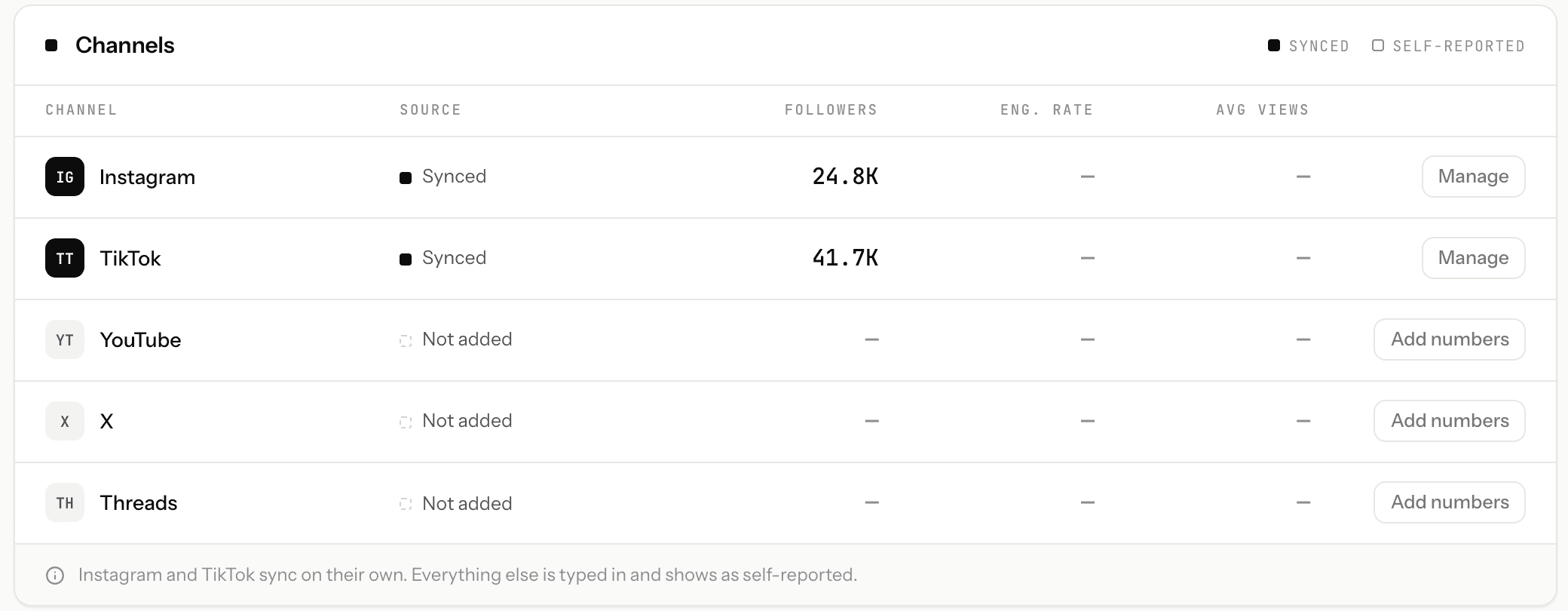
The platforms offer official, read-only APIs through which a creator can grant access to their own metrics. Where that is available, the audience numbers on the record can refresh on a schedule instead of by screenshot. Where it isn't, the creator or manager enters them, and the record should say so.
Outputs that are links first, files second
A media kit at a stable public link is current whenever a brand opens it. A PDF export of that same kit serves the brands that want a file. The mistake is maintaining the PDF as the primary artifact; the link should be primary and the PDF a snapshot of it.
Synced, computed and self-reported: label your numbers
A media kit contains numbers of three different kinds, and a brand can only trust a kit that tells them which is which.
| Kind | What it is | Example | How to show it |
|---|---|---|---|
| Synced | Pulled from the platform's official API after the creator granted read-only access | Follower count, recent post views | Label as synced, with the date it was last refreshed |
| Computed | Derived from synced data by a stated method | Engagement rate calculated from recent posts' views and interactions | Label as computed, and say how (the method should be published) |
| Self-reported | Entered by the creator or manager | A platform with no API access; audience demographics from a screenshot | Label as self-reported, with the date |
Avoid the word "verified" for any of these. It implies a check that hasn't happened; a synced number is exactly what the platform reported, no more. Labelling by origin is more honest and, in practice, more convincing to a brand-side team that has been burned by inflated kits.
A maintenance routine for a roster of media kits
Even with a single-record architecture, some things need a human. This is a routine that managers can sustain; the point is that each step touches the record, never a file.
| Cadence | What to do | Why |
|---|---|---|
| When it happens | Rate changes, new collaborations, availability changes: edit the creator record the day you learn of them | These are the changes brands act on; a delay becomes a wrong number in a pitch |
| Weekly | Glance at each creator's synced numbers for anything that looks wrong (a disconnected account, a sudden drop) | Catches a lapsed connection before a brand sees a stale figure |
| Monthly | Refresh self-reported numbers for any platform that isn't synced; retire outdated content examples; check terms overrides still apply | Keeps the non-synced parts of the record within a month of reality |
| Before a pitch | Open the creator's live kit the way the brand will and read it once | The kit is the product; check it as the customer, not the author |
| Quarterly | Review which creators are pitched most and make sure their records are the most complete | Effort should follow demand |
Tooling options
| Approach | Where the fact lives | Strengths | Weak spot for multi-creator managers |
|---|---|---|---|
| Design template per creator (Canva-style) | In each file | Full visual control; good for a single creator | Every kit is a separate copy; numbers and rates are typed in and go stale |
| A PDF per creator in a shared folder | In each file | Universal format; easy to send | Same copy problem; brands hold old versions |
| Single-creator media kit builders | In one creator's account | Live link, sometimes synced numbers | Built for a creator managing themselves; a manager juggles many logins and no roster view |
| A manager workspace with one record per creator | On the creator record | Kit, roster and rates generated from one record; sync with labels; link plus PDF | Usually opinionated about layout; not a design tool |
Common mistakes
- Treating the PDF as the source. The file should be an export of the record, never the thing you edit.
- Rates in a separate sheet. The single most common cause of a wrong number in a kit.
- Undated numbers. A follower count with no date and no source is a liability.
- Screenshots as data. They are the slowest thing to refresh and the first thing to age.
- Handling creators' passwords to fetch their numbers. Use read-only access the creator grants themselves, or self-report and say so.
- Redesigning instead of restructuring. A prettier template does not fix the copy problem.
- Perfect kits for everyone. Complete the records of the creators you pitch most first.
Recommended approach
Move the source of truth from files to one record per creator, with rates and terms on the record and every number carrying a source and date. Make the media kit a live link generated from that record, keep a PDF export for brands who want a file, and build rosters from the same records so they inherit every update. Then run the routine above on the record, never on the outputs. The design of the kit matters; the architecture is what keeps it true.
Where KitVerify fits
KitVerify is the last row of the tooling table: a workspace for talent managers where each creator is one record. That record has a public media kit at a shareable link with a PDF export, rates and packages, and terms as a reusable global set with per-creator terms. Creators can connect Instagram or TikTok read-only through a delegated link, so supported metrics sync from the official APIs and every number is labelled synced, computed or self-reported; nothing is labelled "verified". Campaign rosters are built from the same records, so a rate or audience change appears in every roster that includes the creator. The media kit automation page shows what updates itself and what doesn't.
Related questions
How do talent managers keep media kits updated?
The managers who keep kits current don't update kits; they update one record per creator and generate the kit from it. Audience numbers refresh through read-only platform connections where available and are self-reported with a date where not; rates and terms live on the record; the kit is a live link with a PDF export. The remaining work is a light routine: edit the record when something changes, glance weekly, refresh self-reported numbers monthly.
Should each creator have their own media kit?
Yes. A brand evaluating one creator wants depth on that creator, and a shared "agency kit" forces them to hunt. Give each creator a kit and use a roster, which links to each kit, when a brand is choosing between several creators.
Is a PDF or a link better for a media kit?
A link should be primary because it is current whenever a brand opens it. Keep a PDF export for brands who need a file for procurement or internal decks. The mistake is maintaining the PDF as the thing you edit; export it from the live kit instead.
How often should a media kit be updated?
Rates, availability and new collaborations: the day they change. Synced audience numbers: automatically, on the platform connection's schedule. Self-reported numbers: monthly at most. If updating requires rebuilding a file, the honest answer is "less often than it should be", which is the argument for a single-record architecture.
KitVerify
Update each creator once. Reuse it everywhere.
In KitVerify every creator is one record with a live media kit, rates, terms and labelled numbers, reused in every roster you send.
About the author
Dennis Tjahyadi · Founder, KitVerify
KitVerify is being built around the workflows of talent managers and creator agencies. This blog documents what we are learning about how those teams organize, maintain and pitch their talent — from product research, conversations with managers, and observing real workflows, not from having managed talent ourselves.
Related reading
- RostersHow to Manage an Influencer Roster Without a Mess of SpreadsheetsWhat a roster actually has to hold per creator, a sample structure you can copy, an honest comparison of spreadsheet, Drive/Notion and purpose-built workflows, and a progressive migration path.
- RostersHow to Create a Creator Roster That You Can Send to BrandsWhat belongs on a brand-facing roster and what stays on each creator's page, how many creators to send, when to show rates, which format to use, and a card template and roster structure you can copy.
- Agency OperationsSpreadsheets vs Talent Management Software: When Should a Creator Manager Switch?Sheets is the right tool for many managers, and the wrong one for some. This is an honest account of where the line is, what the switch actually buys you, and a checklist for migrating without a big-bang weekend.
- Agency OperationsTalent Agency Software Where Each Manager Runs Their Own RosterHow to evaluate a tool when several managers each represent their own creators: per-manager views, one agency-wide record, permissions, and what happens when a manager leaves. Plus an honest account of what KitVerify supports today.