Rosters
How to Manage an Influencer Roster Without a Mess of Spreadsheets
What a roster actually has to hold per creator, a sample structure you can copy, an honest comparison of spreadsheet, Drive/Notion and purpose-built workflows, and a progressive migration path.
What a roster holds per creator
Creator profile
- Social accounts
- Audience
- Niche and categories
- Contact and status
- Rates
- Terms
- Media kit
- Brand history
Every influencer roster starts as a spreadsheet, and that is fine. The spreadsheet is fast, flexible and free. The mess arrives later, quietly: a second tab for rates, a Drive folder of media kit PDFs, audience screenshots in a chat thread, a Notion page someone started for a brand pitch, and no single place where a creator's current information actually lives.
This guide is about the roster as a system. It lays out what a useful roster has to hold for each creator, gives you a sample structure, compares the three ways managers run rosters today, lists the signs that a spreadsheet workflow is breaking, and shows how to move to something better one piece at a time rather than all at once.
How to manage an agency roster effectively
Manage an agency roster effectively by keeping one record per creator and generating everything you send from it. The work that breaks an agency roster is not the number of creators; it is the number of copies of each fact — a rate in the sheet and in the deck and in last month's proposal. Cut the copies to one and the roster stays accurate without anyone maintaining it.
Six practices do most of that work. Each one is small, and each one removes a place a number can be wrong.
- 01One record per creator. Profile, channels, audience, niche, status, rates, terms and past work belong to the creator, not to whichever document you made first. If a fact lives in two places, one of them is already out of date.
- 02Keep rates and terms with the creator. A separate rate sheet is the single most common source of a wrong number in a pitch. Terms are the same: write them once for the creator and let every pitch carry them.
- 03Update once, share by link. Send a link to a live page rather than a file. A file is correct on the day you send it; a link is correct on the day the brand opens it, which may be weeks later.
- 04Put a source and a date on every number. "48,200 · Synced · 3 Sep" and "112,000 · Self-reported · 20 Aug" are different claims, and a brand is entitled to know which one it is reading.
- 05Set a regular refresh for the numbers you type in. The numbers a creator has connected refresh on their own. The ones typed in do not, so pick an interval — monthly is usually enough — and walk the roster.
- 06Keep the internal index separate from what you send. Your index wants to be dense and complete. A brand-facing roster wants to be short and selective. One document cannot be both, and trying makes it bad at each.
The rest of this guide is the long version: what the record holds, a structure you can copy, and how to move without a big-bang weekend.
What an influencer roster actually is
The word "roster" does two jobs, and much of the spreadsheet pain comes from making one document do both.
- The internal roster is your index: every creator you represent, with enough detail to answer "who fits this brief?" without opening anything else. It wants to be dense, scannable and complete.
- The brand-facing roster is a curated view: the two to eight creators relevant to one brand or one campaign, presented so a brand can forward it internally. It wants to be clean, current and selective.
A spreadsheet is a good internal roster and a poor brand-facing one. When managers try to make the sheet presentable, or make the deck complete, both jobs get worse. This guide covers the internal roster; there is a separate guide on creating a creator roster you can send to brands.
The data model of a useful roster
Before choosing a tool, decide what you track per creator. Managers tend to over-track profile trivia and under-track the fields that actually drive decisions. The table below is the working set that shows up consistently in conversations with managers, with the two properties that determine where each field should live: why it matters, and how often it changes.
| Field group | What it holds | Why it matters | How often it changes |
|---|---|---|---|
| Creator profile | Name, handles, location, languages, short bio | Identifies the creator and answers basic brand questions | Rarely |
| Social accounts | One row per platform: handle, link, whether the account is connected | Where the numbers come from | Rarely |
| Audience | Followers, reach, views, engagement per platform, each with a source and a date | The numbers brands ask for first, and the ones that date a pitch | Constantly |
| Niche and categories | Primary niche, secondary categories, content formats | How you match creators to briefs | Occasionally |
| Contact and status | Preferred channel, active / paused / exclusive, availability notes | Answers "can I put them forward?" before anything else | Occasionally |
| Rates and packages | List rates per deliverable, bundles, usage and exclusivity add-ons | The commercial core; negotiated per deal | Often |
| Terms | Payment, usage window, revisions, approvals; global defaults plus creator overrides | The ground rules a brand agrees to alongside the rate | Occasionally |
| Media kit | The brand-facing summary of all of the above | What brands open | Every time anything above changes |
| Brand history | Past collaborations, categories worked, current opportunities and their status | Proof of work and conflict checking | Per deal |
The last column is the important one. "Audience" changes constantly and appears in every media kit, every roster and every proposal, which is why it is the field most often wrong in a pitch. "Rates" change often and are negotiated per deal, which is why a separate rate sheet drifts from the kit within weeks. A roster system is judged by how it handles the fields that change, not the fields that don't.
A sample roster structure
If you are staying in a spreadsheet for now, this is a structure that holds up. One row per creator, one sheet for the index, and the fields that change often kept deliberately thin: a current number, a source, and a date, rather than a history.
| Creator | Platform | Followers | Source · date | Niche | Status | Base rate (post) | Terms | Kit |
|---|---|---|---|---|---|---|---|---|
| Creator A | 48,200 | Synced · 3 Sep | Beauty, skincare | Active | $X | Global | link | |
| Creator A | TikTok | 112,000 | Self-reported · 20 Aug | Beauty, skincare | Active | $X | Global | link |
| Creator B | 21,900 | Synced · 4 Sep | Fitness, running | Paused until Oct | $X | Global + net-45 override | link | |
| Creator C | YouTube | 9,400 | Self-reported · 1 Jul | Tech reviews | Exclusive: audio brands | $X | Global | link |
Three habits make this structure last. Every number gets a source and a date, so a stale figure is visible instead of silently wrong. Rates live on the creator row, not on a separate sheet. And the "Kit" column is a link to the one current media kit, never a copy of its contents.
Creator A
The same record as a profile card, the way a purpose-built tool would show it
- Platforms
- Instagram (synced), TikTok (self-reported)
- Audience
- 48.2K Instagram · 112K TikTok · engagement labelled by source
- Niche
- Beauty, skincare · short-form video, tutorials
- Status
- Active · open to skincare, haircare; not fragrance
- Rates
- Reel, story set, bundle, usage add-on
- Terms
- Global terms apply
- Media kit
- Live link, updated when the record changes
- Brand history
- Two past skincare collaborations; one opportunity in discussion
Three ways managers run a roster today
The spreadsheet workflow
A Google Sheet as the index, a Drive folder of PDF media kits, rates either in the sheet or in a second sheet, and updates arriving by message. It is the default because it costs nothing and needs no setup.
Works well when
- One to three creators
- Brand requests a few times a month
- You can rebuild a media kit in half an hour without it hurting
- One person maintains everything
Strains when
- Rates live in the sheet and in the kit and in last month's proposal
- Audience numbers are screenshots with no date
- Every brand request means assembling a deck by hand
- You keep a "clean" copy for brands and a "real" one for yourself
The Drive / Notion workflow
A step up: a Notion or Airtable database with one page per creator, related tables for brands and deals, and the media kit either embedded or linked. It gives you structure and relations without code, and managers who enjoy building systems get a lot out of it.
Works well when
- You want a custom creator record and have time to design it
- Relations between creators, brands and deals matter to you
- The team is comfortable in a database tool
Strains when
- There is still no brand-facing output: media kits and rosters remain separate documents
- Numbers are typed in by hand, with no sync and no source label
- The person who built the system is the only one who can maintain it
Purpose-built roster software
A workspace whose primary record is the creator and whose outputs (media kits, rate views, rosters) are generated from that record. The structure is decided for you, which is a limitation if your workflow is unusual and a relief if it isn't.
Works well when
- The same creator information appears in several outputs
- Brands ask for shortlists regularly
- You want numbers pulled from the platform and labelled
- You would rather maintain a record than a deck
Strains when
- Your main problem is outbound sales or deal administration
- You need a highly custom data model
- You want everything, including contracts and invoicing, in one tool
The fair comparison is longer than this and depends on your shape. It is laid out in spreadsheets vs talent management software.
Signs the spreadsheet workflow is breaking
- You update a rate and then have to remember which other documents it appears in.
- A brand asks for three creators and it takes an afternoon to assemble the material.
- The audience numbers in a media kit are months old and you know it.
- You have two versions of the roster: one you can look at and one you can send.
- Creator updates arrive over WhatsApp and get applied to some documents but not others.
- Two people edit the sheet and nobody is sure which column is current.
- You have started avoiding brand requests that need fresh material because of the work involved.
Any one of these is normal. Three or more at once means the cost of copies is compounding, and it is worth changing the system rather than working harder inside it.
How to migrate progressively, not all at once
The big-bang migration ("this weekend I move everything") is the one most likely to be abandoned halfway, leaving two half-systems. A progressive migration fixes the most expensive duplication first and keeps the spreadsheet as an index for as long as it is useful.
- 01Add a source and a date to every number in the sheet. No tool needed. This alone makes stale figures visible and changes how you read your own roster.
- 02Move rates onto the creator row. Delete the separate rate sheet. If rates need to be per platform or per package, add columns rather than tabs.
- 03Pick the three creators brands ask about most and build their records properly first. In whatever tool you have chosen, complete one creator end to end: profile, connected accounts, rates, terms, media kit. Use it for the next request that involves them.
- 04Replace the PDF media kits with live links for those creators. The moment a kit is a link to a record instead of a file, the update problem for that creator is solved.
- 05Move the rest of the roster one creator at a time, prioritized by how often they are pitched. Creators you rarely put forward can stay in the sheet for months without cost.
- 06Build your next brand-facing roster from the records, not from the sheet. This is the test: if the shortlist can be assembled from the records in minutes, the migration is working.
- 07Retire the sheet when it stops being the place you look first. It usually happens on its own.
Common mistakes
- Tracking everything. A roster with forty columns per creator is maintained by nobody. Track what drives a decision.
- Keeping rates away from the creator. A separate rate sheet is the single most common source of a wrong number in a pitch.
- Numbers without dates. A follower count with no date is a guess dressed as a fact.
- One document for two jobs. The internal index and the brand-facing roster want different things; let them be different artifacts.
- Migrating in one weekend. Half-migrations leave you maintaining two systems. Move the most-pitched creators first.
- Handling creators' logins. If a tool needs a creator's password to pull numbers, that is a risk you carry for them. Prefer read-only connections the creator grants themselves.
Recommended approach
Decide the creator record first, using the table above, and make it the one place each fact lives. Keep your internal index dense and your brand-facing outputs curated, and generate the second from the first rather than maintaining both. Stay in a spreadsheet while there is one copy of each fact; move to a purpose-built workspace when the copies start multiplying, and move progressively, most-pitched creators first.
Where KitVerify fits
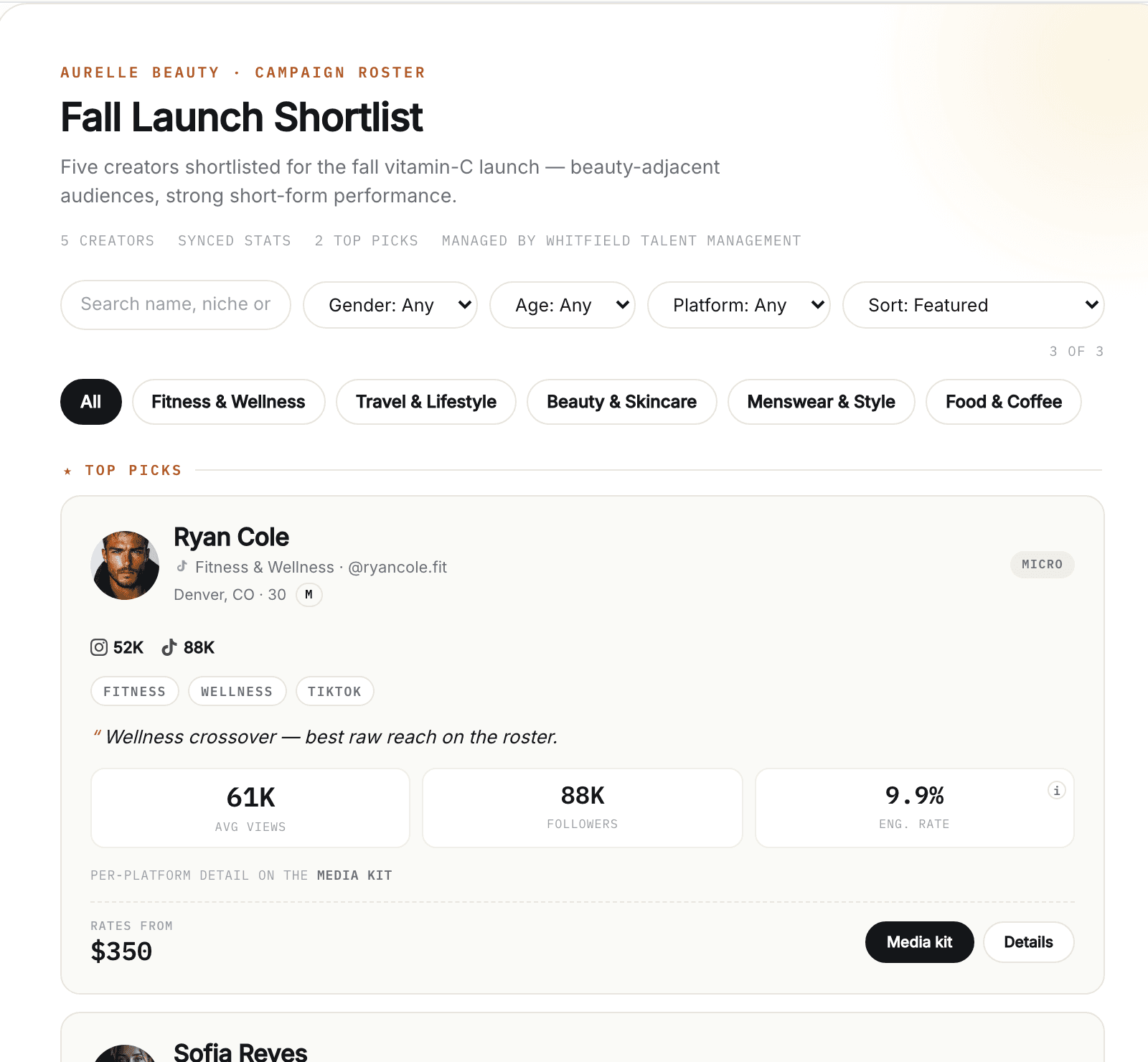
KitVerify is built around the creator record described in this guide. Each creator you manage has one profile with a public media kit, rates and packages, terms (a reusable global set with per-creator terms), and optional read-only Instagram and TikTok sync where every number carries a synced, computed or self-reported label. Brand-facing campaign rosters are assembled from those records and shared as a link or PDF, with rates resolved live from each creator. It does not import spreadsheets; creators are added one at a time, which suits the progressive migration above. The creator roster management page shows the roster itself.
Related questions
How should a creator agency organize its roster?
Around the creator record. Each creator is one entry that holds their profile, social accounts, audience numbers with a source and date, niche, status, rates, terms, media kit and brand history. The internal roster is the full index of those records; a brand-facing roster is a curated subset generated from them for one brand or campaign. Keep the two separate and keep fields that change often, especially audience numbers and rates, in exactly one place.
How many creators can one manager handle?
It depends far more on the system than on a number. The work that scales badly is rebuilding brand-facing material by hand: media kits, rate sheets, rosters. Managers whose outputs are generated from a single creator record handle far larger rosters than those maintaining copies. Fix the copies before worrying about the count.
Should rates live in the roster?
Yes, on the creator record, not in a separate sheet. A rate that lives away from the creator drifts from the media kit and the roster within weeks. If you need per-platform or per-package rates, add structure to the creator record rather than a second document.
What is the best alternative to spreadsheets for managing creators?
For a structured record without brand-facing output, a database tool such as Notion or Airtable. For a record that also generates media kits and rosters, a purpose-built creator management workspace. The spreadsheet itself is a fine index for a small roster; the alternative is needed when the same facts have to be maintained in several documents at once.
KitVerify
Build your creator roster in KitVerify.
One profile per creator: media kit, rates, terms and synced numbers in one record, reused in every roster you send a brand.
About the author
Dennis Tjahyadi · Founder, KitVerify
KitVerify is being built around the workflows of talent managers and creator agencies. This blog documents what we are learning about how those teams organize, maintain and pitch their talent — from product research, conversations with managers, and observing real workflows, not from having managed talent ourselves.
Related reading
- RostersHow to Create a Creator Roster That You Can Send to BrandsWhat belongs on a brand-facing roster and what stays on each creator's page, how many creators to send, when to show rates, which format to use, and a card template and roster structure you can copy.
- Agency OperationsSpreadsheets vs Talent Management Software: When Should a Creator Manager Switch?Sheets is the right tool for many managers, and the wrong one for some. This is an honest account of where the line is, what the switch actually buys you, and a checklist for migrating without a big-bang weekend.
- Media KitsHow Talent Managers Can Manage Media Kits for Multiple CreatorsThe operational problem behind stale media kits is copies, not effort. This guide shows the fragmented architecture most managers run, the single-source alternative, and a routine for keeping every kit current.
- Agency OperationsHow a Talent Agency Moves from Spreadsheets and Airtable to a CRMA practical migration for a creator roster: what to audit before you move anything, how to map your columns onto one record per creator, what to leave behind, and what "CRM" does and does not mean for a talent agency.