Agency Operations
How a Talent Agency Moves from Spreadsheets and Airtable to a CRM
A practical migration for a creator roster: what to audit before you move anything, how to map your columns onto one record per creator, what to leave behind, and what "CRM" does and does not mean for a talent agency.
The migration, in order
- Audit the columns you actually use
- Decide one record per creator
- Map columns to fields
- Clean the data
- Move the most-pitched creators first
- Connect accounts for synced numbers
- Retire the sheet
A talent agency moves off spreadsheets and Airtable one creator at a time, not in one weekend. You audit the columns you actually use, decide that each creator gets exactly one record, map your columns onto that record, clean the values as you go, move the creators you pitch most often first, and let the old sheet retire on its own when nobody opens it any more.
That is the whole method, and the rest of this guide is the detail: which columns to leave behind, what to do with the ones that do not fit, how to handle numbers whose source you no longer remember, and what changes about the work once the move is done. It also answers the part of the question most guides skip — whether a "CRM" is even the thing you are looking for.
First: is a CRM actually what you need?
The answer changes the whole migration. Two different problems hide behind "we need a CRM", and agencies usually have one of them rather than both.
A sales CRM solves this
- I lose track of which brands I have pitched and when
- Nobody follows up, and deals go quiet
- I cannot see what is likely to close this quarter
- Contracts, invoices and payments are scattered
A creator workspace solves this
- Every brand request starts with me hunting for the right file
- The rate in the deck does not match the rate in the sheet
- The audience numbers in a media kit are three months old
- Building a shortlist for a brief takes an afternoon
If your list is mostly on the left, buy a CRM — a real one, with pipelines — and keep your creator information wherever it is. If it is mostly on the right, what you need is a place where each creator has one record and everything brand-facing is generated from it. Some agencies end up with both, and that is a reasonable outcome; the mistake is buying one and expecting it to do the other job.
Step 1 — Audit the columns you actually use
Do not migrate your sheet. Migrate the part of your sheet that is alive. Open it and mark every column against one test: have I read this in the last month to make a decision? Most agency rosters split roughly three ways.
| Verdict | What it looks like | What to do |
|---|---|---|
| Alive | Handle, platform, followers, engagement, niche, status, base rate, payment terms, contact | Map it onto the creator record (step 3) |
| Dead | Columns you added once and never filled, "notes 2", a colour code nobody remembers, a follower count from last year beside a newer one | Leave it in the sheet. Migrating dead columns is how a fresh system becomes a mess in a month |
| Private | Internal opinions, "difficult on deadlines", "will go lower if pushed", commission splits | Keep it out of anything brand-facing. If your new system has no private place for it, keep that one sheet |
The private column deserves its own sentence, because it is the most common accident in this whole migration: a manager forwards a roster that still contains an internal note. Decide now which facts are yours and which are the brand's, and keep the first group somewhere that never renders on a public page.
Step 2 — Decide that one creator is one record
This is the decision that makes the migration worth doing, and it is a decision rather than a feature. It means agreeing that from now on there is exactly one place that holds what a creator charges, one place that holds their audience numbers, and one place that holds their terms — and that every pitch, kit, PDF and roster reads from those places instead of holding its own copy.
It sounds obvious written down. It is not what most sheets do: a typical agency roster has a rate in the index, a rate in the media kit PDF, and a rate in the proposal sent three weeks ago, with no way of knowing which is current. The arithmetic is worked through in spreadsheets vs talent management software — the number of places a fact can be wrong is roughly creators multiplied by brand-facing outputs, and it gets unmanageable well before a roster feels large.
Airtable users often half have this already. One row per creator is the right shape, but if the media kit is still a PDF in Drive and the roster is still a deck, every copy is still there. A structured database with hand-built outputs fixes the index and none of the duplication.
Step 3 — Map your columns onto the record
Now take the "alive" columns and place each one. Most agency sheets map cleanly, because the same working set shows up again and again.
| Your column | Where it belongs | Notes |
|---|---|---|
| Creator name, handle, IG/TikTok link | The creator's profile and channels | One entry per platform, so a creator with three accounts has three rows under one record |
| Followers, reach, average views, engagement rate | Audience, per platform | Carry the source and the date across with the number — see step 4 |
| Niche, categories, content formats | Niche tags on the profile | This is what you filter on when a brief arrives, so keep it tidy |
| Status, availability, exclusivity | Status on the profile | "Active", "paused until October", "exclusive: audio brands" all belong here |
| Base rate, per-deliverable rates, bundles, usage add-ons | Rates and packages on the creator | Delete the separate rate tab once this is filled. That tab is the main thing you are migrating away from |
| Payment terms, usage window, revisions, approvals | Terms on the creator | Write your standard set once and override per creator where it differs |
| Brand contacts, emails, pitch dates, follow-ups | Your CRM, or stay in the sheet | This is the sales-side half. KitVerify has no place for it, and pretending otherwise would cost you the data |
| Past collaborations, links to published work | Past work on the creator | Two or three strong ones beat a full archive |
| Media kit link, deck link, Canva link | Nothing — this becomes the record itself | The kit stops being a file you link to and becomes a page generated from the record |
The last two rows are the point of the exercise: the brand-contact columns do not move, and the media-kit-link column disappears. If the mapping leaves you with many columns that have no destination, that is information — either they were dead, or they are sales-side, or the tool is the wrong shape for your agency.
Step 4 — Clean as you copy, especially the numbers
A migration is the one moment you will ever have a reason to look at every value. Use it. Three cleanups pay for themselves immediately.
- 01Give every number a source and a date. "48,200" is not a fact; "48,200 followers, from Instagram, 3 September" is. If you cannot remember where a figure came from, it is self-reported and its date is unknown — write that rather than presenting it as current. A brand that catches one stale number discounts every number on the page.
- 02Resolve the duplicates. Most sheets have a creator whose rate appears in two columns with different values. Pick one, and pick it by asking what you would actually charge today, not by taking the higher of the two.
- 03Normalise your niches. "beauty", "Beauty", "beauty/skincare" and "skin" are four tags describing one thing, and filtering a roster by them is what makes an agency slow at answering a brief. Agree a short list of niche names and use only those.
None of this needs software. If you never migrate at all, doing these three things inside your existing sheet still makes your roster measurably more trustworthy.
Step 5 — Move the most-pitched creators first
Here is the honest part about importing: in KitVerify there is none. No CSV upload, no Airtable connector, no bulk load. Creators are added one at a time, and their rates, terms and past work are typed in. There is one exception, described in the next section, and it covers Instagram handles rather than your columns.
That constraint decides the order of work, and the order turns out to be right anyway. Pick the three or four creators brands ask about most, build their records end to end — profile, channels, audience, rates, terms, past work — and use those records for the very next real brand request. A migration that has already answered one live request is a migration that finishes. A weekend spent loading twenty-five creators, none of whom has been pitched from the new system yet, is the one most likely to be abandoned half done, leaving two half-systems to maintain. Creators you rarely put forward can sit in the sheet for months at no cost; move them when a brief makes you need them, which is also when you have a reason to check their numbers.
The one shortcut that exists: paste the handles
There is a faster way to get the first records in, and it is worth knowing before you start typing. The roster generator takes two to five Instagram handles pasted in a box and builds a live roster page from them, with follower counts synced from Instagram, engagement rates computed from those numbers, and recent posts. It needs no account.
If you then claim that roster, every creator on it becomes a record in your workspace and the roster itself becomes yours to edit, on the same link you may already have sent a brand. So the fastest route in is: paste five handles, claim, repeat for the next five, then fill in rates, terms and past work by hand. It is Instagram only — TikTok has no public lookup, so a TikTok creator has to connect their own account for numbers to sync — and it will not carry a single one of your spreadsheet columns. What it saves you is the profile and audience typing, which is most of the tedium.
Step 6 — Have creators connect their accounts
The columns that cost an agency the most upkeep are the audience numbers, because they change constantly and appear in every output. This is the one part of the migration that removes work permanently rather than moving it.
Send each creator a connect link. They sign in to Instagram or TikTok themselves, grant read-only access, and the metrics those official APIs expose refresh onto their record with a source label and a last-synced time. You never hold a password. Anything the APIs do not expose stays typed in and stays labelled as self-reported, with the date it was entered — and that label is the point: a brand can see which figures came from the platform and which came from the creator. The mechanics, including how often it refreshes, are on how syncing works.
Two practical notes. Not every creator will connect, and a roster of partly-synced and partly-typed numbers is fine as long as the labels are honest. And connection is per platform: a creator with Instagram connected and YouTube typed in shows exactly that.
Step 7 — Retire the sheet, and what to keep
Do not delete it. Stop opening it. The signal that the migration is done is behavioural: a brand asks who fits a brief and you go to the workspace, not the sheet, without thinking about it. Keep two things afterwards — your brand-side columns, which never had a destination in the mapping above and still need somewhere to live, and a plain export of the roster as it stood on migration day, filed somewhere boring.
What changes, and what does not
What gets better
- A rate change is one edit, and every kit, PDF and roster reads it
- Audience numbers refresh on their own for connected accounts
- A shortlist for a brief is a selection, not a rebuild
- A link you sent last month is still accurate this month
- Every number on a brand-facing page says where it came from
What does not change
- You still bring your own brand relationships
- Rates, terms and past work are typed in and kept current by you
- Contracts, invoicing and payments live elsewhere
- Sales follow-up is still yours to track
- A creator who will not connect an account still needs manual numbers
An agency that reads the right-hand column and decides the move is not worth it has made a reasonable decision. The left column is the whole return, and it is only large if the duplication on your side is large.
Where KitVerify fits
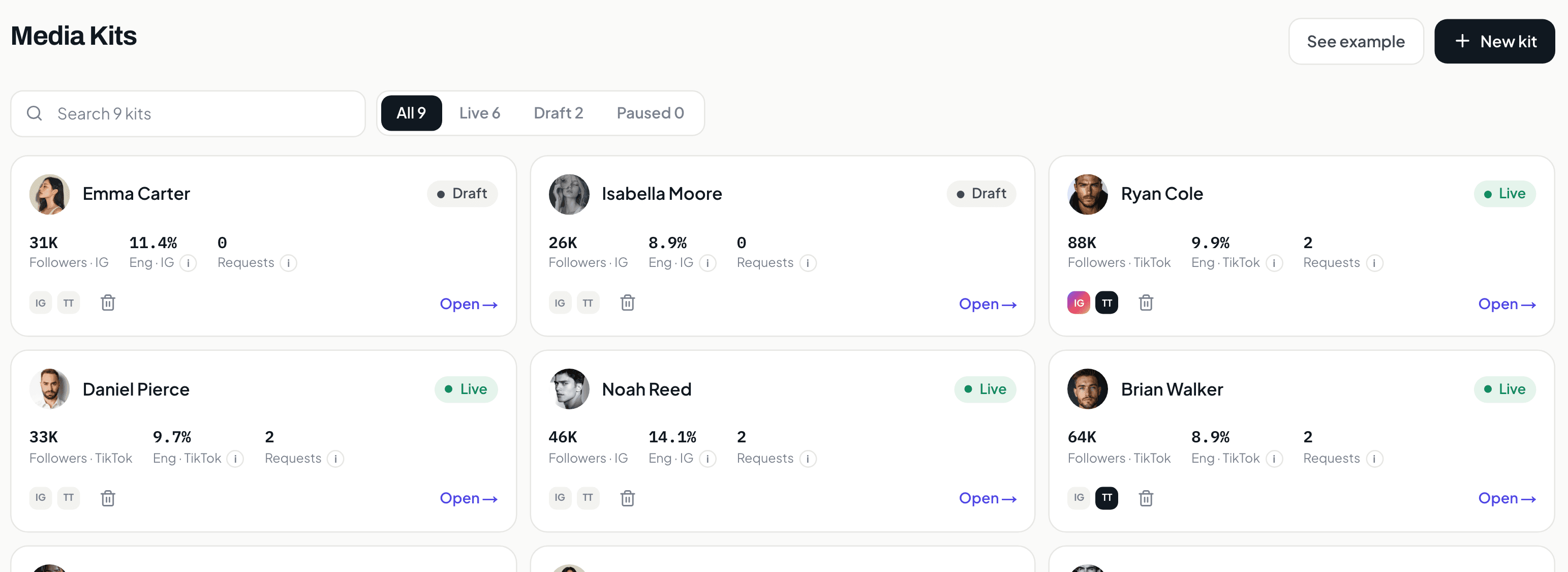
KitVerify is the destination described in step 2: one record per creator holding profile, channels, audience, niche, status, rates and packages, terms, and past work. From that record a public media kit publishes at a shareable link, a PDF exports, and any campaign roster the creator appears on reads the same figures rather than copying them. Optional read-only Instagram and TikTok connections keep the audience numbers current, and every figure carries a synced, computed or self-reported label with a date. What it does not do is import your spreadsheet, replace a sales pipeline, or handle contracts and invoicing. For the wider comparison of tool categories, talent manager tools maps them side by side.
Related questions
How does a talent agency move from spreadsheets and Airtable to a CRM?
Audit which columns you actually use, decide that each creator has exactly one record, map the surviving columns onto that record, clean the values as you copy them (especially putting a source and a date on every number), build the records for your most-pitched creators first and use them on the next real brand request, have creators connect their social accounts read-only so audience numbers refresh themselves, and stop opening the sheet. Keep your brand-side columns — contacts, pitch history, follow-ups — wherever they already are, because a creator workspace has no place for them.
Can I import my roster from Airtable or a CSV into KitVerify?
No. There is no CSV import and no Airtable connector. Creators are added one at a time and their rates, terms and past work are typed in. The one shortcut is the roster generator: paste two to five Instagram handles and claim the roster it builds, and each creator becomes a record with their profile and audience numbers already filled in. Your own columns still have to be entered by hand.
Is KitVerify a CRM?
Not in the sales sense. There are no brand contacts, deal stages, pipelines, reminders or forecasts, and no outbound email, sequences or brand discovery. It manages the creator side: media kits, rates and packages, terms, campaign rosters, and inbound collaboration requests that arrive in one list with a simple status. If you need a real pipeline, keep the CRM you have and use KitVerify for the creator side.
Should I move the whole roster at once?
No. Move the three or four creators brands ask about most, use their records on the next real request, and add the rest as briefs make you need them. A big-bang migration is the one most likely to be abandoned half finished, which leaves you maintaining two systems instead of one. Creators you rarely pitch can stay in the sheet for months at no cost.
What happens to my old media kit PDFs?
They stop being the thing you maintain. Once a creator's information lives on one record, the media kit is a page generated from it at a shareable link, and a PDF is an export you produce when a brand asks for a file rather than a document you update. Keep the old PDFs archived if you like; just do not send them once the record exists, or you are back to two copies.
KitVerify
Start with five handles, not a spreadsheet.
Paste a few Instagram handles and see your roster as a live page, with follower counts synced and engagement rates computed. Claim it and every creator becomes a record you can fill in. No account needed to try it.
About the author
Dennis Tjahyadi · Founder, KitVerify
KitVerify is being built around the workflows of talent managers and creator agencies. This blog documents what we are learning about how those teams organize, maintain and pitch their talent — from product research, conversations with managers, and observing real workflows, not from having managed talent ourselves.
Related reading
- Agency OperationsSpreadsheets vs Talent Management Software: When Should a Creator Manager Switch?Sheets is the right tool for many managers, and the wrong one for some. This is an honest account of where the line is, what the switch actually buys you, and a checklist for migrating without a big-bang weekend.
- RostersHow to Manage an Influencer Roster Without a Mess of SpreadsheetsWhat a roster actually has to hold per creator, a sample structure you can copy, an honest comparison of spreadsheet, Drive/Notion and purpose-built workflows, and a progressive migration path.
- Agency OperationsWhat Is a Talent Manager CRM? A Practical Guide for Creator AgenciesA sales CRM tracks companies, contacts and deals. A talent manager tracks creators, audiences, rates, terms and media kits. This guide explains the difference, what a creator agency CRM should contain, and how to choose one.
- Agency OperationsTalent Agency Software Where Each Manager Runs Their Own RosterHow to evaluate a tool when several managers each represent their own creators: per-manager views, one agency-wide record, permissions, and what happens when a manager leaves. Plus an honest account of what KitVerify supports today.