Influencer Rate Card: What Goes on It, With a Filled Example
A rate card lists what you charge per deliverable and what costs extra. Here is a filled one, how each line is priced, and the rule for which prices brands see and which stay private.
What brands can see
- Your packages and what each one includes
- A From price per package, if you choose to show one
- Which extras exist: usage, whitelisting, exclusivity
What stays private
- Your minimum for each deliverable
- The exact price for this brand, in a quote
- Discounts for bundles and repeat brands
A brand writes "Can you send your rates?" and you have two bad options: a long email you type from memory, or a number you guess on the spot. A rate card fixes that. You decide your prices once, write them down in the same order every time, and send the same answer to every brand that asks.
Most rate card guides stop at a list of things to include. The harder question is which of those numbers a brand should see before it has a brief. This guide covers both: what goes on the card, a filled example with real prices, how each line is priced, and a simple rule for what you publish and what you keep.
What goes on an influencer rate card
A rate card has seven parts. The first three are about you; the last four are about money. Brands skim it in seconds, so each part should fit on one line.
| Part | What to write | Example |
|---|---|---|
| Who you are | Name, handles, niche, one line on your audience | "Home cooking for busy parents, 24K on Instagram, 15K on TikTok" |
| Proof | Followers and engagement rate, with the date | "24,000 followers · 4.83% engagement · as of November 2026" |
| Deliverables | One row per thing you make, with its price | "Instagram Reel, up to 60 seconds" |
| Packages | Two or three bundles a brand can pick whole | "Reel + 3 Story frames" |
| Extras | Everything priced on top, each on its own line | "Whitelisting: +25%" |
| Terms | Turnaround, revisions, payment | "7-day turnaround · 1 round of revisions · 50% upfront" |
| Valid until | The date the prices stop applying | "Prices valid until 31 March 2027" |
The last row is the one people forget. Your follower count changes, and so should your prices. A card with no date tells a brand it can hold you to last year's number.
A filled influencer rate card example
Here is a complete card for an illustrative creator, invented for this example and not a real account: 24,000 Instagram followers with a 4.83% engagement rate (1.25× the 3.86% average for that size), and 15,000 TikTok followers. Every price comes from the rate calculator with those inputs.
| Deliverable | From price (public) | Minimum (private) | Included |
|---|---|---|---|
| Instagram Reel | $375 | $275 | Up to 60 s, 1 round of revisions, organic posting only |
| Instagram carousel | $325 | $250 | Up to 10 images, caption written by you |
| Instagram Story frame | $150 | $125 | One frame with a link sticker, live 24 hours |
| TikTok video | $200 | $150 | Up to 60 s, organic posting only |
| UGC video (not posted by you) | $300 | $225 | One edited video, delivered as a file |
| Package: Reel + 3 Story frames | $750 | $650 | 10% off the parts ($825) |
Two columns of price is the point of the example. The From price is what you would charge for the plain deliverable, and it is the only number a brand ever sees on your kit. The minimum is the lowest you would go, for a bundle, a repeat brand or a slow month. You never write it on anything a brand can read.
The 10% bundle discount is this creator's choice, not a standard. If you discount a bundle, show the price of the parts next to it, so the brand can see what it saves.

How to price each line of your rate card
You do not need a different method for every row. Start from one base number and move it, in this order.
1. Base: one number per 1,000 followers
The most quoted starting point is about $100 per 10,000 followers for a sponsored post. Hootsuite's influencer pricing guide (March 2026) calls it a benchmark "many brands use", and says the real base rate is still yours to set. At 24,000 followers that is about $240 for an in-feed post before anything else moves it.
2. Deliverable: video and effort cost more
A Reel takes longer to make than a single photo, and a Story frame disappears after a day. The calculator prices a Reel and a TikTok video at $12.50 per 1,000 followers, a carousel at $11, an in-feed post at $10 and a Story frame at $5. These are its own rules of thumb, shown on the calculator page, not survey data.
3. Engagement: adjust, but cap it
If your engagement rate beats the average for your size, you can charge more, but not proportionally more. Brands do not pay double for double engagement. The calculator moves the price by your rate ÷ the tier average, capped between 0.75× and 1.5×. The example creator's 1.25× is why the Reel lands at $375 rather than $300. Not sure of your rate? The guide to a good Instagram engagement rate shows how to work it out.
4. UGC: price the asset, not the audience
UGC (user-generated content) is a video or photo you make for the brand to post on its own channels. Your followers never see it, so your follower count should not set the price. Price it per asset by effort instead. The calculator starts a UGC video at $300, whatever your follower count.
5. Extras: one line each, on top of the base
Your base price should cover organic posting only: the post lives on your account and the brand can share it. Everything the brand buys beyond that is its own line. Separate lines let a brand drop what it does not need without asking you to cut the whole price.
| Extra | What the brand gets | Uplift | Reel with it |
|---|---|---|---|
| Whitelisting | Runs your post as a paid ad from your handle | +25% | $469 |
| Category exclusivity | You skip competitors for an agreed term, such as 30 days | +20% | $450 |
| Paid usage window | Runs your content as an ad from its own account for 30, 60 or 90 days | Quote it per brief | Depends on the window |
| Perpetual buyout | Keeps and uses the content anywhere, with no end date | 1.5–3× the base | $563–$1,125 |
| Rush delivery | Gets the post faster than your normal turnaround | Quote it per brief | Depends on the date |
Charging for this is normal. In a survey of more than 400 influencers by Lumanu and the agency Collectively, 51% said they charge a fee on top of their content fee when a brand wants to whitelist, boost or amplify their content. Lumanu's own guidance puts that fee anywhere from close to 0% (when you include it) to 50–100% of your rate.
6. Minimum: decide it now, in private
Before a brand pushes back, decide the lowest price you will accept for each deliverable. The example uses the bottom of the calculator's band. Deciding it now means a lowball offer gets a quick, calm answer instead of a nervous one. Write it down somewhere only you or your manager can see.
Should you put your rates on your media kit?
Both answers are fine, and a media kit works without any prices on it. The choice is about who sees your prices first. These are the four options, from most open to most private.
| Option | What a brand sees | Good for | Trade-off |
|---|---|---|---|
| From prices | Each package with "From $X" | Creators getting many small inbound briefs | Brands anchor on the From number |
| "Rates on request" | The packages, without prices | Rates that change a lot by brand | One extra email before a brand knows if it can afford you |
| "Custom quote" | The packages, marked as quoted per brief | Larger deals with usage and exclusivity | Every brief needs a written quote |
| No rates section | Numbers and past work only | Agencies that never publish prices | Brands ask about price first |
Whichever you pick, the rule from the top of this guide holds: the From price can be public, the minimum never is. A From price filters out briefs that were never going to reach your number. A minimum on a public page becomes the price every brand asks for.
Talent agencies often go further. While KitVerify was building private quotes, an agency's operations lead told us they never put prices on a talent's media kit. Every brand gets its own quote, because two brands asking for "one Reel" rarely want the same thing.
Common rate card mistakes
- No date. Prices without a "valid until" date can be held against you a year later.
- Usage folded into the base. If the Reel price quietly includes 90 days of paid ads, you have given away the most valuable line on the card.
- A single price per row with no "From". A bare number reads as fixed. "From" tells a brand the price moves with scope.
- Engagement you cannot back up. If the card says 4.8%, a brand should be able to check it. A kit whose numbers sync from Instagram does that for you.
- UGC priced per follower. It underprices a small creator who makes great video, and overprices a large one.
- A PDF that goes stale. Every PDF you send keeps its old prices forever. A link to a live kit shows the current ones.
Copy this: your reply when a brand asks for your rates
Most brands ask for rates before they share a brief. Reply with scope questions and your From prices, not your full card. Copy the text below and fill in the brackets.
Reply template: "Can you send your rates?"
Plain text, ready to paste into an email or DM. Fill in the brackets.
Hi [name], thanks for reaching out. I'd love to hear more about [brand].
My media kit, with my current numbers and packages, is here: [link to your kit].
Reels start from [From price], and Reel + Story packages from [package price].
To send an exact quote, could you share: the deliverables, the posting dates, whether you'd like to run the content as ads (and for how long), and any exclusivity?
Happy to turn it around within [one or two] days of hearing back.
[Your name]
The four questions in the fourth line are the ones that change the price most. Once a brand answers them, your quote is your From price plus the extras it asked for, which is why the extras sit on separate lines.
Rate cards for a roster of creators
A talent manager keeps one rate card per creator, but the rules should be the same across the roster: the same extras, the same uplifts, the same terms. A brand comparing two of your creators can then compare the base prices directly. Keep each creator's minimum private, and decide per pitch whether a brand sees prices at all. The guide to building a creator roster for brands covers the pitch itself.
Where KitVerify fits
The influencer rate calculator works out the band for each deliverable from your followers and engagement, shows the arithmetic, and prices the extras on separate lines. No account needed. The Put these rates in a media kit button carries the bands into the media kit generator as packages.
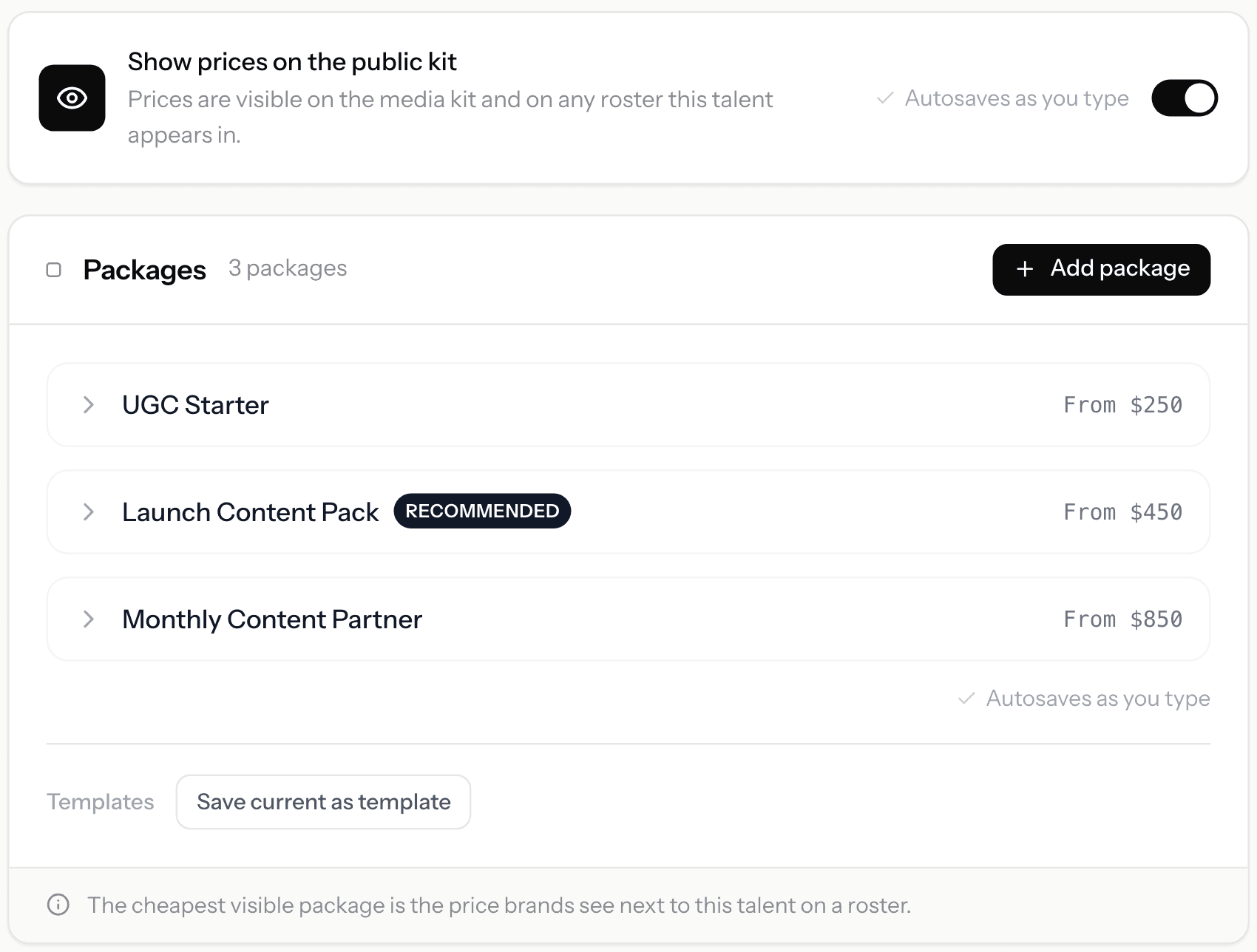
On a KitVerify media kit, each package shows an exact price, a From price, "Rates on request" or "Custom quote", and one switch hides prices across the kit and every roster. A rate card can also have its own page. On manager plans, each creator gets private minimums, and each brand gets a quote sent as a link.
Related questions
What is an influencer rate card?
A short document listing what a creator charges per deliverable, such as a Reel, Story set or UGC video, plus what costs extra: usage rights, whitelisting, exclusivity and rush delivery. It saves a round of email every time a brand asks for rates.
What is the difference between a rate card and a media kit?
A media kit shows who you are and why a brand should work with you: your audience, numbers and past work. A rate card shows what it costs. Many creators put a short version of the rate card inside the media kit, as packages with From prices, and send the full card on request.
Should I put my rates on my media kit?
Either works. From prices on the kit filter out briefs that cannot reach your number; keeping prices off keeps room to negotiate, and many agencies prefer it. Whichever you choose, never publish your minimum.
How much should I charge with 10K followers?
A common starting point is about $100 for an in-feed post at 10,000 followers, from the $100-per-10,000 benchmark. Video, strong engagement and extras such as usage rights move it up. The rate calculator works out a band for each deliverable from your own numbers.
Should usage rights be included in my rate?
No. Your base rate should cover organic posting on your account. If the brand wants to run your content as ads, keep it for a set time or own it outright, price that as a separate line so it can be added or dropped.
How often should I update my rate card?
Whenever your numbers change meaningfully, and at least every few months. Put a "valid until" date on every card you send, so an old price cannot be held against you.
Do I need a rate card as a UGC creator?
Yes, and it looks different: price per asset (one video, one photo set), not per follower, with extras for raw footage, more hooks and rush delivery. Your follower count does not belong in a UGC price. The UGC creator rates guide has the published 2026 numbers and a worked quote.
Sources
- Hootsuite, influencer pricing guide (16 Mar 2026), the $100-per-10,000-followers benchmark · read 4 Nov 2026
- Lumanu, how influencers charge for whitelisting and usage rights, the 51% survey figure (400+ influencers, with Collectively) and the 0–100% fee guidance · read 4 Nov 2026
KitVerify
Work out your rate card in a minute.
Enter your followers and engagement rate. The calculator gives a band for every deliverable, prices the extras on separate lines, and shows the working, so you know your From price and your minimum before a brand asks.
About the author
Dennis Tjahyadi · Founder, KitVerify
KitVerify is being built around the workflows of talent managers and creator agencies. This blog documents what we are learning about how those teams organize, maintain and pitch their talent — from product research, conversations with managers, and observing real workflows, not from having managed talent ourselves.
How KitVerify sources and labels every number it shows: methodology.
Related reading
- Media KitsInfluencer Media Kit Examples: What Each Section Looks Like on a Real KitNot templates, but examples. The sections of an influencer media kit as they render on a live kit, one clearly labeled demo you can open, and the shape to copy at every follower size.
- Rates & MetricsWhat Is a Good Engagement Rate on Instagram? Benchmarks by Follower Count (2026)There is no single good Instagram engagement rate, because it falls as accounts grow. Here are the tier averages, the thresholds for good and excellent, and how to work out your own rate without one viral post skewing it.
- Rates & MetricsUGC Creator Rates in 2027: What Talent Managers Should Charge BrandsPublished 2026 data puts a typical UGC video near $175–$200, with experienced creators far above that. How to place a creator on that range, price every extra on its own line, and send a quote that adds up.
- RostersHow to Create a Creator Roster That You Can Send to BrandsWhat belongs on a brand-facing roster and what stays on each creator's page, how many creators to send, when to show rates, which format to use, and a card template and roster structure you can copy.